How to Share a Coding Agent's Files Without Letting a Symlink Widen Access
Scope shell.online --files to one resolved output directory, see how the host refuses symlink escapes, and learn what hard links still let through.
Artemii Amelin10 min read
Contents
On September 26 the maintainers of brig, a tool that runs a coding agent inside a microVM on your own machine, published advisory GHSA-wp6x-29qx-fpr7, rated high with a CVSS score of 8.2 and fixed in brig 0.3.0. Two days later Peyton Kennedy of Endor Labs, who reported it, explained how it worked. brig checked the workspace directory carefully but handed the project folder to the runtime as an unresolved path. An agent with write access to the project could replace a subdirectory with a symlink to any other directory on the host, and the next run that named that subdirectory mounted the link's target into the sandbox, read and write.
Adversa AI put the bug in its October roundup of coding agent security research, next to a run of other cases where the files in a project turned out to be the attack. The lesson reaches beyond sandboxes. Any time you expose a directory that an agent writes into, the agent decides what that directory contains, links included. If the code that exposes it trusts a path without resolving it, the agent can widen what you exposed.
shell.online can expose a directory too. With --files, people watching a session in the browser can open files from the machine the session runs on. This guide shows how to choose that directory, how the host refuses a link that points outside it, and what it still lets through. Every behavior below comes from the shell.online repository at v0.25.0, and I checked the symlink and hard link cases on macOS.
Step 1: Pick the smallest root when you start the session
File access is off unless you ask for it when the session starts. There are two flags. --files shares regular files under the command's working directory. --files-root shares a directory you name and leaves the command's working directory alone:
cd ~/work/example-app
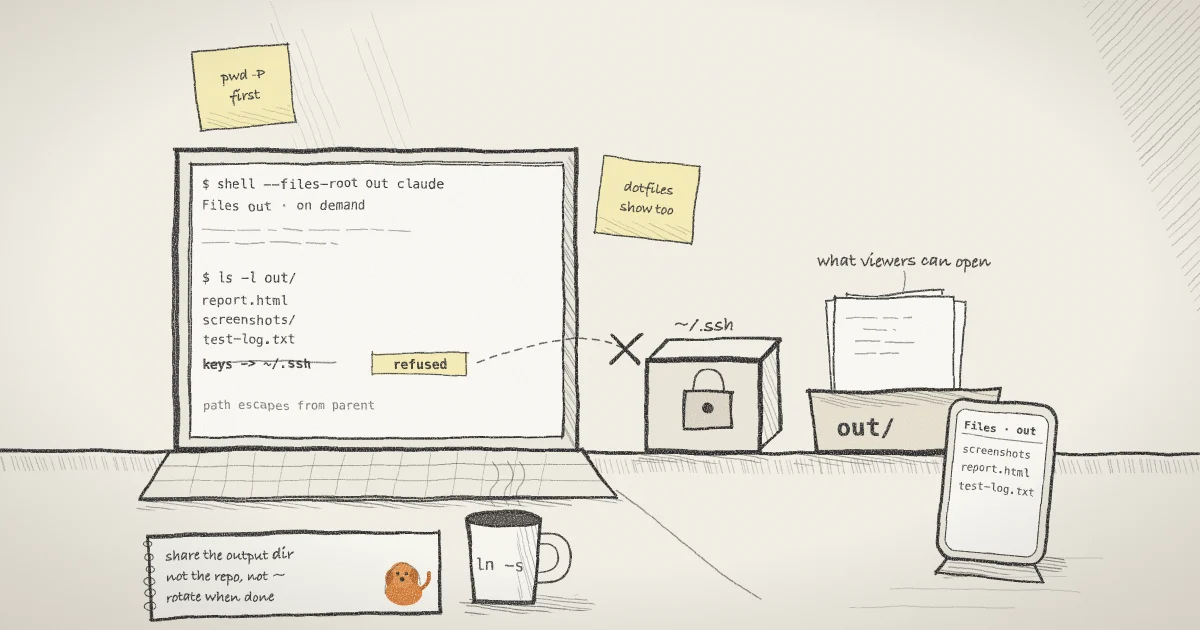
shell --files-root ./out claudeClaude Code runs in ~/work/example-app with its usual access, and browser viewers can reach only what sits under ./out. The session card shows the root by its last path component:
  Access     view and type · end-to-end encrypted
Files out · on demandIf you add --json, the new-session event carries the same value in a files field. If the directory does not exist, shell stops with an error that includes open shared files root and exits with status 1 before anything is shared.
Two limits come with the flags. File sharing needs end-to-end encryption, so shell --no-e2ee --files ... stops with shell: --files and --files-root require end-to-end encryption. And the root is fixed for the life of the session. There is no command to add a directory to a running share, so choose before you press Enter. The CLI reference lists both flags.
A good root is a directory the run produces output into: test reports, screenshots, a build's dist folder, a training run's checkpoints. A poor root is the repository itself, and a bad one is your home directory.
Step 2: Resolve the root yourself
The host opens the root once, at startup, with Go's os.Root type. If the path you pass is itself a symlink, that link is followed when the root is opened. I confirmed this on macOS: a root given as linkroot, a symlink to another directory, opened that other directory and served its files.
That matters when the root is a directory the agent could have touched on an earlier run, which is the brig situation. Endor Labs' workaround for unpatched brig users applies here unchanged: resolve the path before you hand it over, so there is no link left to follow. pwd -P prints the physical directory with every symlink resolved:
ls -ld ./out
shell --files-root "$(cd ./out && pwd -P)" claudeThe first command shows whether out is a real directory or a link, with an arrow and a target if it is a link. The second starts the session on the resolved path. If the card then shows a name you did not expect, stop the session and look at the directory before you share the link.
Step 3: Open files from the browser
Viewers see a Files control in both the xterm.js view and the Refstream view. Nothing is sent ahead of time. The browser asks for a directory listing when someone opens the panel, and asks for a file when someone opens that file. Refstream also turns filenames that appear in terminal output into previews, but the Refstream page is explicit that a filename printed on screen does not grant access to it. The security page adds that every request is checked on the host, including traversal and symlink escapes.
From the file service in the CLI, these are the limits a viewer meets:
- A listing holds at most 256 entries per directory and shows only directories and regular files. Symlinks, device files and sockets are left out.
- A preview can be up to 16 MiB and a download up to 128 MiB. Larger files are refused.
- Files move in 16 KiB chunks that the browser pulls one at a time, so a slow phone does not hold up the terminal.
- If a file changes while it is being sent, the transfer stops with "The file changed during transfer." rather than handing over half of two versions.
- The host serves at most eight file requests at once and answers the rest with a busy error.
Requests and file bytes travel over the session's existing encrypted WebSocket. The relay routes request IDs and sees encrypted frame sizes, not paths or contents. The encryption page covers what the relay can and cannot read.
One rule surprises people: a read-only link can still read files you opted in. --read-only blocks typing into the process. It does not withdraw file access. The post on read-only links after Plugin4Shell covers what read-only does block.
Step 4: See what happens when the agent plants a link
Here is the brig move against a shell root. Suppose the agent, or a script it ran, does this inside the shared directory while the session is live:
cd ~/work/example-app/out
ln -s ~/.ssh keysTwo things happen on the host. First, keys does not appear in the Files panel, because listings skip symlinks. Second, if a viewer requests keys/id_ed25519 by name anyway, the open fails and the host answers "File unavailable." A path with .. in it, or an absolute path outside the root, is turned away even earlier by the host's own path check, with "File access denied."
The refusal does not come from comparing strings. As the Go team's post introducing traversal-resistant file APIs describes it, os.Root disallows any operation that would escape the root through .. or through symlinks. A comment in shell's file service states the intent: escapes fail at the filesystem boundary rather than through string-prefix checks. In my macOS test, opening escape/key through a link pointing outside the root failed with "path escapes from parent". This is the class of bug CWE-59, link following, describes, and it is close kin to the path traversal attacks OWASP documents for web servers.
A symlink that stays inside the root is different. os.Root permits it, so a viewer who already knows the link's name can open it, even though the listing does not show it.
Everything regular under the root is readable, including dotfiles. The host does not hide names that start with a dot. If you run shell --files claude at the top of a repository, a viewer can open .env, .git/config and anything else in that tree. Manifold Security's GitSpawn research is a reminder of how much can live in .git/config alone. Point --files-root at an output directory instead.
Step 5: End file access
File access lasts as long as the viewer's connection to the session. To cut off everyone who has the current password without stopping the agent, rotate it:
shell list
shell password rotate 7f3a9cshell list prints your active sessions with their IDs, and the rotate command takes a session ID or a prefix of one. Rotation disconnects old viewers, changes the password and salt, and revokes existing MCP grants. The process keeps running. The guide to revoking a link without killing the process walks through what each viewer sees. To end the run and the link together, use shell kill -- 7f3a9c.
What this setup does not do
- It does not stop hard links. A hard link is another name for the same file, not a pointer to a path, as the symlink(7) manual page explains. If the agent runs
ln ~/.config/example/token out/tokenon the same filesystem, the root now holds a regular file with that content. In my macOS test,os.Rootopened such a file without complaint. The defense is the same as in Step 1: a root that holds only output you would hand over anyway. - It does not sandbox the agent. The root limits what browser viewers can fetch. The process you wrap still runs with your user's permissions and can read whatever you can. Containing the agent is the job brig does, with its own bugs to patch. shell's Docker guide shows how to run a shared terminal inside a container if you want that boundary.
- It does not cover mount points. The Go post says
os.Rootdoes not stop traversal of mount points such as Linux bind mounts, since only root can create them. - It does not let viewers write. The file protocol has three requests: capabilities, list and read. There is no upload, rename or delete.
- It does not vet the content. A file the agent wrote is the agent's output. Treat a downloaded script or notebook from an agent run like any other untrusted file.
- I checked the symlink and hard link behavior on macOS only. Windows and Linux go through the same Go API, but I did not test them here.
The earlier post on sharing a session without handing over the filesystem covers the design of the file feature when it shipped.
Where Pilot Protocol fits
shell.online is built by the team behind Pilot Protocol, a networking stack for autonomous agents. A Files panel is for a person who wants to look at a report. When one agent needs to hand a dataset or a set of weights to another agent, Pilot's write-up on peer-to-peer file transfer between agents shows how files stream over an encrypted tunnel without a storage bucket in the middle. The same scoping question applies there: decide which peer may receive what before anything moves. The Pilot security docs describe how a private node rejects streams from a peer unless it has an approved trust relationship with that peer or the two share a network.
Share the output, not the machine
Start the run with --files-root pointed at a resolved output directory, and keep the repository and your home directory out of reach.