How to Read an Agent Skill Before It Can Share Your Terminal
Check a SKILL.md against its release, list its hosts, find loosened oversight and watch its first run, using the shell.online skill as the worked example.
Artemii Amelin10 min read
Contents
- Step 1: Download it and compare it with the release
- Step 2: List every host it names
- Step 3: Search for instructions that loosen oversight
- Step 4: Separate what it asks from what shell enforces
- Step 5: Install a copy in one repository
- Step 6: Run the first trial where someone can watch
- What this does not do
- Where Pilot Protocol fits
Adversa AI published the first edition of its agent skill security digest on November 4, 2026. The item I would read first is a study posted on October 27 by Timofey Sanko and Yuan Tian. They looked at 1.53 million English skills and found that about 1 in 17, roughly 88,000, tells the agent to skip approval, bypass a check or keep going without checking in. In 70.1% of those the instruction applies unconditionally. Open-source scanners caught at most 46% of them, with precision below 0.4.
The same digest points to AIR Security's report by Eliad Mualem and Dor Granat on the render-deploy skill in OpenAI's official repository. The fault was one wrong hostname. It described private Render services as living under render-internal.com, a domain Render did not own and anyone could register. Codex wrote that domain into generated code and deployment config in testing. When the researchers registered it as a sinkhole, real applications sent it requests carrying tokens. Render removed the references on August 14, and OpenAI pulled the plugin on August 26.
A skill is text your agent acts on with your session's privileges, and on a long run nobody reads it at the moment it matters. This guide reads one before installing it, using the shell.online skill as the example, since it can put your terminal on a browser link. The output below comes from running these commands on macOS against the file served on November 4. The shell behavior comes from the v0.25.0 code and help text. The trial in Step 6 was not run end to end, so your agent may handle the prompt differently.
Step 1: Download it and compare it with the release
Put the files in a scratch folder that no agent scans. Claude Code reads personal skills from ~/.claude/skills/ and Codex reads user skills from $HOME/.agents/skills, so a new folder is out of the way.
mkdir -p ~/skill-review && cd ~/skill-review
curl -fsSL https://shell.online/skill/shell-online/SKILL.md -o SKILL.md
curl -fsSL https://shell.online/skill/shell-online/agents/openai.yaml -o openai.yaml
curl -fsSL https://shell.online/downloads/SHA256SUMS -o SHA256SUMS
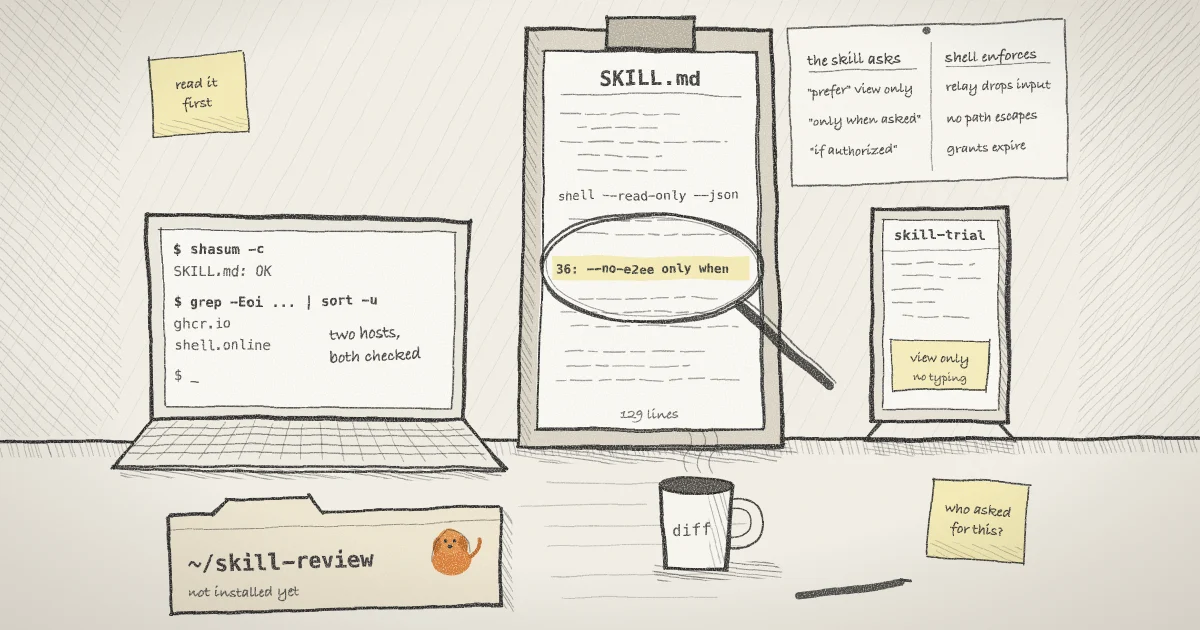
grep ' SKILL.md$' SHA256SUMS | shasum -a 256 -cThe last line prints SKILL.md: OK. The release build adds the skill to the same manifest as the binaries, which is why it can be checked this way. That file comes from the same origin as the skill, so also compare against the GitHub repository at the release tag:
curl -fsSL https://raw.githubusercontent.com/TeoSlayer/shell.online/v0.25.0/public/skill/shell-online/SKILL.md | diff - SKILL.mdNo output means the two match. A later difference is a reason to read the diff, since the site can move ahead of a tag. Pilot's post on checking the shell.online installer explains the limit of this kind of check: a matching hash says the file is what the publisher listed, and says nothing about whether it is clean.
The manifest does not list agents/openai.yaml, so read it. It is four lines: a display name, a short description and a default prompt. The skill folder holds those two files and no scripts.
Check that on any other skill. The Agent Skills specification allows a scripts/ folder and any other files. Clone the skill and run git ls-files before you read anything. Jie Liao and colleagues paired harmless Python source with a substituted bytecode cache and reached 94 to 100% attack success across 100 skills and seven scanners, so a .pyc file in a skill is a stop sign.
Step 2: List every host it names
The Render mistake was a hostname in a reference file. Search for hostnames rather than URLs, because the skill also showed the bare form [service-name].render-internal.com.
grep -Eoi '([a-z0-9-]+\.)+(com|net|org|io|dev|ai|app|sh|online)\b' SKILL.md | sort -uFor this file it prints:
ghcr.io
shell.onlineRun against the two sample addresses from AIR's report, the same command prints internal-api.render-internal.com and postgres.render-internal.com. Check each name against the vendor's own documentation. Render's private network page uses short internal addresses such as elasticsearch-2j3e:9200 and does not mention that domain. For the shell skill, the first name is the container registry for the project's Docker image and the second is the service itself.
Step 3: Search for instructions that loosen oversight
The digest's example of a loosening directive is --no-verify. Start with a search for that family, plus two features that run or approve things on their own:
grep -nE -- '--no-[a-z0-9-]+|--dangerously|--yolo|--force|bypass|sudo|without asking|allowed-tools|!`' SKILL.mdOn this file it finds two lines, trimmed here:
36:Use `--no-e2ee` only when the operator explicitly requests the compatibility/debugging opt-out. ...
55:`--no-e2ee`.Line 36 is conditional, which is the difference the study measures. Line 55 ends a sentence forbidding that flag with file access.
The two extra terms come from Anthropic's skills documentation. allowed-tools pre-approves tools for the turn that invokes the skill, and workspace trust does not gate it. A line of the form !`git diff HEAD` runs a command before Claude sees the skill. Setting "disableSkillShellExecution": true turns that off.
A grep only finds the words you thought of, and even the best scanner in that study missed more than half. Read the prose as well.
Step 4: Separate what it asks from what shell enforces
Most of this file is requests to a model. Some have a limit behind them in the CLI or the relay, and some do not. Sorting them tells you what you are trusting the model to do.
- View-only links. The skill says to "prefer"
--read-onlywhen you only need to monitor. Once chosen it holds: the relay answers browser input withaccess_deniedand the host drops it too. Nothing makes the agent choose it, and interactive is the default. - Files. The skill says to enable
--files"only when the operator explicitly asks". The CLI cannot tell who asked. It does enforce the scope: parent traversal, device files and symlink escapes are rejected, and--no-e2eecannot be combined with file access. - MCP grants. The skill says "only when the operator authorizes".
shell mcp grantis an ordinary command that the same user can run, so an agent with Bash can run it. What holds is the design covered in the post on scoped grants and on the agents page: grants expire, and a read-only session cannot be made interactive with one.
The skill is therefore not a permission boundary. It teaches an agent to use a program that is already on your PATH, and an agent that never loaded it can run shell too. OWASP's Agentic Skills Top 10 has an entry for over-privileged skills, AST03. If you want a prompt in Claude Code before the sensitive commands, add rules to .claude/settings.json:
{
  "permissions": {
    "ask": ["Bash(shell mcp grant *)", "Bash(shell password *)"]
  }
}Anthropic's permissions page says such a rule matches the command text Claude writes and "isn't a security boundary around the program".
The password goes into the transcript. The skill tells the agent to read share_url and e2ee_password from the JSON event and send both "in the active conversation". For status it tells the agent to run shell list --json, which carries the password again. Anything the agent reads becomes part of a conversation that is stored and sent to your model provider. If the session stays open afterward, run shell password rotate <ID> in your own terminal, and do not ask the agent for that session's status again.
Step 5: Install a copy in one repository
A project copy limits the skill to sessions in that repository. For Claude Code:
mkdir -p .claude/skills/shell-online
cp ~/skill-review/SKILL.md .claude/skills/shell-online/SKILL.mdThen add disable-model-invocation: true to the frontmatter of your copy, under description. Claude can then load the skill only when you type /shell-online. For Codex:
mkdir -p .agents/skills/shell-online/agents
cp ~/skill-review/SKILL.md .agents/skills/shell-online/SKILL.md
cp ~/skill-review/openai.yaml .agents/skills/shell-online/agents/openai.yaml
printf 'policy:\n allow_implicit_invocation: false\n' >> .agents/skills/shell-online/agents/openai.yamlThat setting defaults to true, and Codex's documentation says that with false it no longer invokes the skill from your prompt, while an explicit $shell-online still works. The skill's description mentions remote progress monitoring, so without this a passing request about monitoring could match it.
Your copy will not update itself. Fahd Seddik traced about 2.19 million skill adoptions on GitHub and found copies rarely change when their source does, so fixes seldom reach them. To check yours later:
curl -fsSL https://shell.online/skill/shell-online/SKILL.md | diff - .agents/skills/shell-online/SKILL.mdOn Claude Code, use the .claude path. The diff should show only your added frontmatter line.
Step 6: Run the first trial where someone can watch
Wrap the agent itself in a view-only share, so you or a teammate can watch from a phone or a second screen:
shell --read-only --name skill-trial claude
shell list
shell attach <ID>The first command prints a link and a password and returns. shell list gives you the ID. Browser input is blocked on this session, and the check that blocks it sits on browser frames only, so you answer the agent's permission prompts from the terminal you attached with. Press Ctrl-X, then D, to detach. The post on read-only links for coding agents covers this kind of session. Inside the agent, ask for something small:
/shell-online share npm test with a view-only linkIn Codex, start the outer session with codex and begin the prompt with $shell-online. npm test stands in for any short command you already trust. The skill's documented form, which the post on agents sharing their own session walks through, is:
shell --read-only --json -- npm testCheck four things on the screen. The flags should be the ones you asked for, with no --files and no --no-e2ee. The JSON event should show "read_only":true and "encrypted":true. If your agent collapses tool output, shell list in another terminal shows each session's access mode. The agent should say which process the link exposes, as the skill requires. It should not run the installer, since command -v shell finds your copy. The inner share gets its own password, because since 0.24.1 a shared program does not inherit its session's password.
The Render domain turned up in code the agent generated, so finish by looking there:
git status --short
git diff | grep -Eoi '([a-z0-9-]+\.)+(com|net|org|io|dev|ai|app|sh|online)\b' | sort -ugit diff skips untracked files, so read any new file that the first line lists. A share closes when its process exits. Close whatever is left, inner session first:
shell list
shell mcp list <ID>
shell kill -- <ID>shell mcp list shows any grant the agent issued. The CLI guide has the rest.
What this does not do
- It does not prove a skill is safe. The checks catch what is written in plain text. Pandey and colleagues profiled 6,309 marketplace listings and found that 59% of those declaring permissions understate what their bundles can do.
- The host search misses a name built from pieces, an encoded one, or a top-level domain you left out of the list.
- A view-only link limits the browser. The agent keeps whatever permissions its own mode and rules give it, and shell does not sandbox the process.
- Watching is not a control. shell does not scan skills, flag a bad command or stop a run because of what it printed.
Where Pilot Protocol fits
shell.online is developed by Pilot Protocol, a networking stack for autonomous agents, and the same questions apply there. Pilot's skills directory lists 82 SKILL.md files that teach an agent to use pilotctl, with source on GitHub. The steps above apply to those too.
Pilot's limits on reaching another agent do not depend on what a skill says. In its trust model, two agents need an approved handshake, and without trust or a shared network a private node silently rejects incoming streams. A skill can tell an agent to send a message, and the receiving node still decides. That is the split from Step 4, and I would look for it in any tool an agent can reach.
Read the skill before your agent does
It is 129 lines of Markdown. Compare it with the release, list its hosts, then decide which repository gets a copy.
Open SKILL.md on GitHub