How to Fork a Claude Code Conversation Into a Browser Link Mid-Session
Fork a live Claude Code conversation into a browser link with shell claude, keep the password out of the transcript, and see what the copy keeps and loses.
Artemii Amelin10 min read
Contents
- Three ways to reach a running conversation
- Step 1: Check what the fork will inherit
- Step 2: Start the fork from inside the conversation
- Step 3: Keep the link and password out of the transcript
- Step 4: Open it, and know who can answer prompts
- Step 5: Pass flags by writing the fork yourself
- Step 6: Stop the fork
- What this setup does not do
- When the other side is an agent
Anthropic released Claude Code 2.1.317 on November 3, 2026. Three lines in its changelog deal with the same problem, which is what happens to a conversation's identity when a second process touches it. A claude -p run inside a cloud or self-hosted runner session no longer shares that session's ID, which used to write into the parent's transcript and could make a restart resume the wrong conversation. The "Resume this session with" hint at exit now repeats your launch flags ahead of --resume. Remote Control forks now get names such as "Name (fork 2)".
If you run a long agent conversation on your own computer, the same problem appears when you want to leave your desk, or when a teammate should look at where things stand. You want the history in a second place without two writers on one transcript. shell.online has a form for this. When Claude Code's Bash tool runs a bare shell claude, shell starts a fork of the current conversation on a browser link and leaves the original open.
This guide starts that fork, keeps its link and password out of the conversation that launched it, and lists what the copy keeps and loses. The shell behavior here comes from the v0.25.0 code. The fork arguments were checked on macOS against a stub program named claude, so what Claude Code does with them comes from Anthropic's documentation.
Three ways to reach a running conversation
Anthropic's session documentation warns that if you resume the same session in two terminals without forking, messages from both interleave into one transcript. That rules out the plain second window.
Remote Control connects claude.ai/code or the Claude app to the session on your machine and keeps the conversation in sync across your devices. It requires a claude.ai subscription and does not support API keys, and on Team and Enterprise plans an Owner has to enable it.
A shell fork gets its own session ID and diverges from the original. It uses your local claude sign-in. The person opening the link needs the link and the password, and the project's README says no account is needed to try it. Terminal payloads are encrypted between your machine and each browser.
Step 1: Check what the fork will inherit
The fork is a new process built from the saved transcript, so it misses some of what the original has. These rules for claude --resume <session-id> come from the same page:
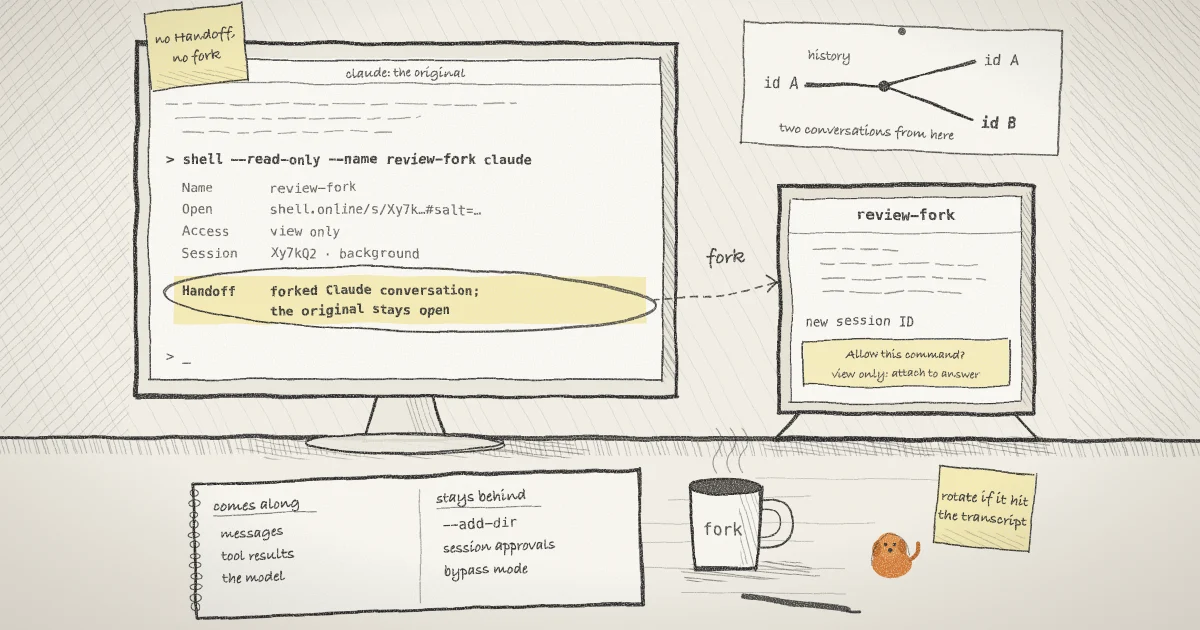
- Messages, tool calls and tool results carry over. A compacted conversation opens at a "Conversation compacted" row.
- Manual mode stays manual unless a
defaultModein a settings file applies. Auto mode returns only if your account still meets its requirements. - A session in
bypassPermissionsdoes not get it back. Neither does plan mode under--fork-session. Both start in the mode a new session would use. - "Allow for this session" grants stay behind. You approve those commands again in the fork.
--mcp-config,--settings,--plugin-dir,--fallback-modeland--add-dirare not restored, and neither are directories added with/add-dir. Settings files are read again at launch.- Background Bash and monitor tasks are not restored.
If a token or a customer record went through a tool result, it travels with the fork, so read the conversation as a viewer would. Then ask Claude to run these two commands:
pwd
grep -ns SessionStart .claude/settings.json .claude/settings.local.json ~/.claude/settings.jsonThe first matters because shell does not change directory: in the stub check, the forked program started in the directory the command ran from. The second lists hooks that will fire again, because SessionStart hooks run on a fork too, with source set to "fork". This check does not cover hooks from plugins.
Straiker published a proof of concept on October 8 in which a parent session ran claude -p through its shell inside a malicious repository, and a SessionStart hook from that repository sent environment data to an outside server. Anthropic closed the report as Informative. shell's fork is an interactive session, and Anthropic's permissions documentation says the trust dialog appears only in interactive sessions, so that exact path does not apply here. A hook in a folder you already trusted still runs. CERT-EU's October 30 write-up makes the wider point: tool permissions and approval prompts govern the model's actions, and code running beside the model is outside them.
Step 2: Start the fork from inside the conversation
Ask Claude to run this command, and approve the Bash prompt if one appears:
shell --read-only --name review-fork claude--read-only makes the server block browser input, and --name labels the session. Both are flags for shell, so the fork still applies. The command prints a card and returns, with the fork running in the background:
  Name       review-fork
  Open       https://shell.online/s/Xy7kQ2mNpA#salt=EXAMPLE
  Password   exAmple-pw
  Vault      not linked · run shell auth
  Access     view only · end-to-end encrypted
  Session    Xy7kQ2mNpA · background
  Closes     when the task exits
  Handoff    forked Claude conversation; the original stays open

  Rejoin     shell attach Xy7kQ2mNpA
Stop shell kill -- Xy7kQ2mNpAshell looks for CLAUDE_CODE_CHILD_SESSION=1 and a UUID in CLAUDE_CODE_SESSION_ID, which Anthropic's environment variable reference says Claude Code sets in Bash tool subprocesses. It then runs claude --resume <id> --fork-session, the pair the CLI reference describes as creating a new session ID.
It also removes five variables first: CLAUDECODE, CLAUDE_CODE_CHILD_SESSION, CLAUDE_CODE_SESSION_ID, CLAUDE_CODE_BRIDGE_SESSION_ID and CLAUDE_CODE_REMOTE_SESSION_ID. A child process inherits a copy of its parent's environment, so without this step the fork would carry its parent's identity. In the stub check they were gone from the fork's environment and an unrelated variable came through.
No Handoff line means no fork. The rewrite applies only to a bare claude with nothing after it. shell claude --model sonnet runs exactly that, with a new conversation and no history, and in the stub check the Claude variables stayed in its environment. Anthropic documents that a nested interactive claude started this way is left out of --resume, --continue and claude agents. --foreground also turns the fork off, and so does running shell claude in your own terminal, where those variables are not set. Step 5 covers the case where you need flags.
Step 3: Keep the link and password out of the transcript
That card went to the Bash tool, so it is now a tool result. Claude read it, and the transcript under ~/.claude/projects stores tool results. To keep it out, discard the output at the start:
shell --read-only --name review-fork claude >/dev/null 2>&1In the stub check this form exited 0, printed nothing and started the same fork. The trade is that you cannot see the Handoff line, so confirm the fork in the browser. Collect the details in a terminal of your own, outside Claude's Bash tool:
shell list
shell list --json
shell password Xy7kQ2mNpAshell list prints one row per session and cuts the link short, so take the full link from --json, which also holds the password. The fork's row shows the command as claude, because shell records what you typed and not the rewritten arguments:
ID          NAME         UPTIME  RELAY   CLOSES   ACCESS          COMMAND  SHARE URL                             PASSWORD
Xy7kQ2mNpA  review-fork  12s     online  on exit  view-only+e2ee  claude   https://shell.online/s/Xy7kQ2mNpA#s…  stored
Long URLs and full credentials: shell list --jsonIf the card already went through the tool, rotate from your own terminal:
shell password rotate Xy7kQ2mNpAIt prints a new Link: and Password: and disconnects existing viewers, without restarting the process. The link changes because the salt lives in the URL fragment, the part a browser handles itself. Rotation does not erase output somebody already saw. An earlier post on revoking a link covers this command.
Step 4: Open it, and know who can answer prompts
Send the link and the password over different channels, as described in this post on sharing a session password. For a phone, see the mobile guide and the post on reading Claude Code as a conversation.
On a read-only link nobody in a browser can answer anything, and a fork has a few things to ask. Claude Code may show its workspace trust dialog if it does not trust the directory yet. It may show "Resume this conversation?", which Anthropic says can appear for a long conversation after a long break or on a different model. Approvals you gave "for this session" are asked for again. All of these wait for a keyboard, so step in locally:
shell attach Xy7kQ2mNpALocal input goes to the process while the browser link stays live. Press Ctrl-X, release it, then press D to detach and leave the fork running. To drive the fork from your own phone, drop --read-only in Step 2, and treat the password as permission to type into a live agent.
Step 5: Pass flags by writing the fork yourself
If the session depends on --add-dir or --mcp-config, the bare form loses them. The 2.1.317 hint shows the flags you launched with, but only at exit. Get the session ID by asking Claude to run this:
echo "$CLAUDE_CODE_SESSION_ID"Then start the fork from your own terminal, in the project directory, with the flags you need:
cd ~/src/example-app
shell --read-only --name api-fork claude --resume 11111111-2222-4333-8444-555555555555 --fork-session --add-dir ../apiYour own terminal does not have the Claude variables, so nothing needs removing. The card has no Handoff line here, because shell passes the command along untouched and you did the forking. shell list records this command line, session ID included, and its table cuts long ones short. Add --permission-mode here to override the restored mode.
Step 6: Stop the fork
shell kill -- Xy7kQ2mNpAshell kill terminates the wrapped process and takes the link offline. The original conversation is a different process and keeps running. On macOS and Linux the host starts in its own session through setsid, so it sits outside the Bash tool's process group. I have not tested what a real Claude Code exit does to it, and I would not assume either way, so run shell list after you close the original.
The transcript outlives the link. Forks appear as separate rows in the /resume picker, and the default retention is 30 days.
What this setup does not do
- It does not move the running process. shell's help text is plain on this: the original stays open, and the two conversations diverge from that point.
- It does not fork your files. Both conversations work in the same checkout, and neither knows what the other changed. If both will edit, give each its own git worktree and start a new session there.
- It does not limit Claude.
--read-onlyblocks input from the browser. What the fork may do is still set by its permission mode and rules, and shell is not a sandbox. OWASP's entry on excessive agency is a useful test for what you leave approved. - It was not checked on Windows. The stub check was macOS only.
The security page lists what the relay can see while the link is open.
When the other side is an agent
A fork puts a conversation in front of a person, on the machine that holds the transcript. Anthropic's documentation says --resume looks for an ID in the current project and then in other projects on this machine, so it does not help an agent on another computer.
That gap is what Pilot Protocol, the networking stack behind shell.online, works on. Its guide to Claude Code agent teams over Pilot has a manager send subtasks to specialists on other machines over encrypted tunnels. A node's endpoint stays hidden until a handshake is approved, which fits two agents better than a link and a password. Those agents exchange tasks and results, not a forked conversation.
Fork your next Claude Code conversation
Install shell, ask Claude to run a bare shell --read-only claude, and check for the Handoff line. The CLI guide has the other commands.