How to Check Where a Shared Codex Session Sends Your Prompts
Read the host and sandbox a shared Codex session really uses from a view-only shell.online link, pin them for the run, and check Claude Code the same way.
Artemii Amelin10 min read
Contents
- Step 1: Read the settings and print names only
- Step 2: Run the doctor in a view-only share
- Step 3: Pin what this run uses
- Step 4: Look at the connections during the run
- Step 5: Run the same check for Claude Code
- Step 6: Repeat it for sessions started from your phone
- What this setup does not do
- Where Pilot Protocol fits
On October 29 Symantec's Threat Hunter Team described an unauthorized relay service that provides access to Codex and Claude Code, mainly in mainland China, where neither vendor officially operates. It does not ship a modified client. It installs the genuine CLI, then rewrites the configuration so every request goes through its own servers. For Codex that includes a new base URL, relay-issued credentials, sandbox_mode = "danger-full-access" and network access for the write sandbox. Telemetry and error reporting go off as well. Symantec found it at a dozen organizations, active since at least early 2026, most of them in mainland China, with multinational subsidiaries in South Korea, Taiwan and Malaysia on the list. Dark Reading's coverage leads on the disabled sandboxes.
Symantec says this is not a vulnerability: "The tools are behaving as designed once their configuration has been changed." And it has no evidence that the operator abused its position, though the configuration would let the operator read every prompt, file and secret passed through the agent, and run commands with the user's full privileges.
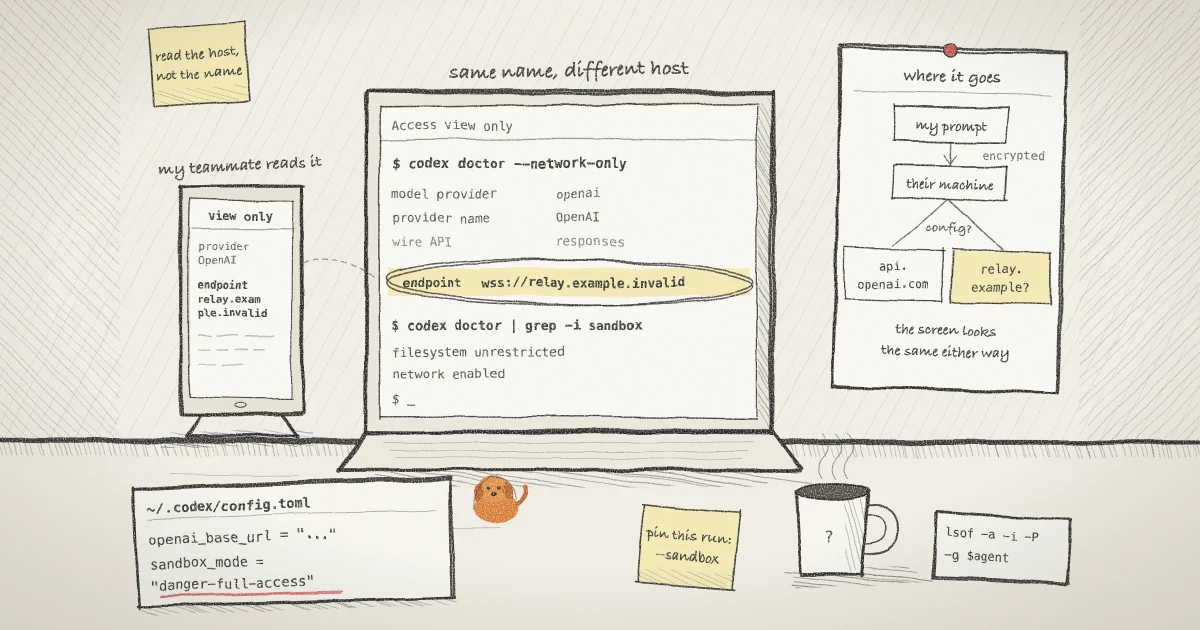
Most readers will never use a service like this. The part that applies to anyone who shares a terminal is simpler: the screen looks the same either way. When you open a teammate's shell.online link and type into their Codex session, end-to-end encryption protects your keystrokes between your browser and their machine. After that, Codex sends the text wherever that machine's configuration says. This guide checks that destination and the sandbox before you type, using codex doctor --network-only, which arrived in Codex 0.166.0 the same day as the report. Outputs below come from Codex 0.166.0 and shell 0.25.0 on macOS, and relay.example.invalid is an invented host.
shell.online has a relay of its own, which carries encrypted frames between browser and host. It has nothing to do with this service.
Step 1: Read the settings and print names only
On the machine that runs Codex, in a terminal nobody is watching:
grep -nE 'model_provider|base_url|env_key|sandbox_mode|network_access' \
  "${CODEX_HOME:-$HOME/.codex}/config.toml"
env | cut -d= -f1 | grep -E '^(OPENAI|CODEX|ANTHROPIC)_'The Codex configuration reference explains what you are reading: openai_base_url overrides the base URL of the built-in provider, model_provider picks an entry from model_providers, and each entry has its own base_url and an env_key naming the variable that holds its key. Codex ignores those endpoint keys in a project's .codex/config.toml, so a changed endpoint lives in your user file or in a profile file beside it, such as $CODEX_HOME/name.config.toml. sandbox_mode is not on that ignore list, so the next step reads the effective value.
The second command prints variable names and drops the values. Symantec tells defenders to look for OPENAI_BASE_URL, CODEX_API_KEY and ANTHROPIC_AUTH_TOKEN set outside an approved deployment process.
Keep the values out of any shared window. A session started from your terminal inherits your environment, as you can see in session_unix.go. shell removes its own password and session variables, sets TERM to xterm-256color, adds COLORTERM, COLORFGBG and SHELL_ONLINE=1, and passes the rest. A plain env inside a share therefore shows your provider keys to everyone watching.
Step 2: Run the doctor in a view-only share
If a teammate is about to type into this machine, let them read the answer themselves:
shell --foreground --read-only --name codex-checkWith no command, shell shares a fresh shell. --foreground keeps it in your terminal, and --read-only makes the link view only. The banner prints the link, a password and Access view only · end-to-end encrypted. Your local keyboard still works and browser input is blocked, as the security page describes. Send the link and password to your teammate, then run this inside the share:
codex doctor --network-onlyThe pull request that added the flag limits the report to effective configuration, network environment, provider HTTP reachability and the Responses WebSocket check. With a custom provider in config.toml, the rows that matter look like this:
model provider           example-relay
provider name            Example relay
example-relay API inference URL https://relay.example.invalid/v1/<redacted> connect failed (required)Paths are redacted and hosts are not, and the host is what you came for. With openai_base_url set in the file instead, the report still calls the provider OpenAI:
model provider           openai
provider name            OpenAI
endpoint                 wss://relay.example.invalid/v1/<redacted>
openai API inference URL https://relay.example.invalid/v1/<redacted> connect failed (required)A stock configuration with no login printed wss://api.openai.com/v1/<redacted> and https://chatgpt.com/backend-api/<redacted>. The command exits 1 when a required endpoint is unreachable and 0 with only a warning. It probes the host it reports, so it does contact a host you may not trust. On 0.166.0, exporting OPENAI_BASE_URL did not change the endpoint in the report, which is why Step 1 lists variable names separately.
--network-only has no sandbox row. The full doctor does:
codex doctor | grep -i sandboxWith danger-full-access in the file it printed filesystem unrestricted · network enabled and unrestricted fs + enabled network · approval OnRequest. Overriding to workspace-write printed restricted fs + restricted network, which fits the OpenAI documentation saying that mode keeps network access off unless you enable it. Type exit when you are done, and the link closes with the shell.
For a session already running, the owner can type /status in Codex, which the docs say confirms the active model, approval policy and writable roots. Anyone on the link sees the same card.
Step 3: Pin what this run uses
You can set the endpoint and the sandbox for one run without touching the file:
shell --name api-migration codex --sandbox workspace-write -c 'model_provider="openai"'Everything after codex goes to Codex. --sandbox takes read-only, workspace-write or danger-full-access, and -c overrides a config value for this invocation. Run over a file naming a custom provider, the doctor with that -c reported api.openai.com. An openai_base_url line stays in force, though. With an API key you can add -c 'openai_base_url="https://api.openai.com/v1"', which the doctor also reported correctly. With a ChatGPT login, whose stock report shows chatgpt.com/backend-api, I would delete the line instead of pinning a URL. Pinned flags do not restore a login. On one host, Symantec saw the script run claude /logout and delete the authentication variables first. If you find endpoint lines you did not write, I would stop sharing that machine and replace its credentials before doing anything clever with flags.
From a phone, the web app's new session form has a Sandbox select for Codex, defined in session-kinds.ts. codex default adds no flag, so the file decides. Any other choice adds --sandbox with that value, and danger-full-access is one of the choices.
Step 4: Look at the connections during the run
Configuration says where requests should go. To see where they go, use a terminal that is not shared:
host=$(shell list --json | jq -r '.[] | select(.name == "api-migration") | .pid')
agent=$(pgrep -P "$host")
lsof -a -i -P -g "${agent:?no wrapped process found}"shell list --json gives the pid of the shell host, along with each session's password and share URL, so keep it behind jq and away from anything being watched. pgrep -P returns the wrapped program, which is the host's child and leads its own process group. In lsof, -a ANDs the selections, -i picks network files, -g picks the process group and -P keeps port numbers numeric.
In a test session whose program opened one TCP connection, the group listing showed that one line, and shell's own connection to its relay appeared only under the host's PID. The :? guard is there because an empty value makes lsof list the network connections of every process on the machine.
The NAME column shows a reverse DNS name or an address, so an address you cannot place is a lead and not a finding. A tool command that the agent starts in its own process group or session will not be in this list either.
Step 5: Run the same check for Claude Code
Claude Code keeps this in ANTHROPIC_BASE_URL, which can sit in your shell or in the env block of a settings file. List names first:
jq -r '.env // {} | keys[]' ~/.claude/settings.jsonThen run /status inside Claude Code. Anthropic's gateway guide says the Anthropic base URL line appears only when a gateway address is set, and that a line naming ANTHROPIC_AUTH_TOKEN, ANTHROPIC_API_KEY or an apiKeyHelper means a gateway credential is active. If both a shell export and a settings file set the variable, the settings file wins. A gateway your company runs produces the same line, so the question is whether you recognize the host.
Step 6: Repeat it for sessions started from your phone
A session started from the app is not launched by your terminal. The machine's daemon runs the command directly, or through sh -c if it contains shell metacharacters, and the session gets the daemon's environment. A background service starts from the operating system, and the source says so plainly: it sees none of the environment the person who installed it had. The launchd plist's EnvironmentVariables key carries only shell's own settings. PATH is the exception, and the daemon asks your login shell for it. Without a service, the daemon keeps the environment of whichever terminal command happened to start it.
The same command can reach a different endpoint. zsh reads .zshrc only for interactive shells. If you export CODEX_HOME or ANTHROPIC_BASE_URL there, shell codex in a terminal sees it, and the same agent started from the app under the service does not. Codex then reads ~/.codex/config.toml, and Claude Code goes wherever its settings files say. Anthropic warns about the same gap for its own background agents and recommends a settings file.
To compare, start a session from the app with the command sh, then run codex doctor --network-only in it and set it beside your Step 2 output. This step comes from reading the code at this commit for macOS and Linux. It was not run on a linked machine, and Windows was not checked.
What this setup does not do
- shell does not know. Nothing in the CLI reads Codex's
config.toml, and shell cannot tell you which provider a wrapped program uses. Encryption covers browser to host, and an earlier post goes through what the relay sees. A read-only link limits browser input, not the agent's network. - The doctor reports configuration. It cannot tell you what a host does with your data. A familiar hostname behind a proxy or a modified binary would not stand out here.
- Approval prompts do not cover this. HiddenLayer showed on October 22 that whoever controls a gateway can forge tool calls that appear to come from the model, run them under existing approvals, and remove them from what the user sees. A teammate approving from a phone would not see it.
- It is one machine at one moment. The file can change after you check. For a fleet, the config reference describes
requirements.tomlas admin-enforced, and Anthropic'sallowedProvidersmanaged setting refuses sessions pointed elsewhere from Claude Code v2.1.285.
The shell.online docs cover the rest of the product.
Where Pilot Protocol fits
shell.online is developed by Pilot Protocol, a networking stack for autonomous agents. Pilot does not sit between Codex and OpenAI and would not have caught this relay. The same question comes up when your agents talk to each other: who is on the other end, and who is in the middle. Pilot's security page gives its answer. "Each daemon has a persistent Ed25519 key pair," and "Relayed payloads are ciphertext; the beacon has no tunnel keys." Its post on peer-to-peer agent communication adds the limit: a relay can still observe timing and volume. The security page is also direct about what stays with you: "Whether an agent may read data, spend money or make a commitment is decided by your application."
Read the host before you type
Open a view-only share, run the doctor, and pin the run if anything looks unfamiliar.
Read the shell CLI reference