How to Read a Long Claude Fable 5.2 Review's Findings From Your Phone
Run a Claude Fable 5.2 review in Claude Code behind a read-only shell.online link, share one findings folder, and read each finding on your phone as it lands.
Artemii Amelin10 min read
Contents
- What you need
- Step 1: Make a findings folder and keep it out of Git
- Step 2: Start the review with a read-only link and one shared folder
- Step 3: Read the findings on your phone
- Step 4: Answer the agent's questions from your own machine
- Step 5: Let a teammate read along, then close it
- What this setup does not do
- When the next reader is an agent
On November 9 Anthropic released Claude Fable 5.2 and Claude Mythos 5.2, two names for the same underlying model. Fable 5.2 is the one anyone can use, at $8 per million input tokens and $40 per million output tokens. Mythos 5.2 goes only to vetted organizations. The examples in the announcement are long jobs. An engineer at Uber ran a security audit for 10 to 12 hours with about 170 reviewer agents. Anthropic formalized Fermat's Last Theorem in 30 hours, and one of its engineers had the model coordinate over 1,000 subagents for eight days to build a prototype operating system.
Claude Code shipped support the same day. The 2.1.321 changelog adds claude-fable-5-2 with a 1M token context as the default Fable model, and the model configuration page says Fable 5.2 needs version 2.1.321 or later. So the obvious first experiment is a long review of your own repository, left to run while you do something else.
On a run like that, the terminal is not where the result lives. It scrolls past. The findings worth reading end up in files. This guide starts a Fable 5.2 review in Claude Code with shell.online, tells the agent to write one file per finding into a single folder, and shares only that folder with your phone. You read the findings as they land, you answer the agent's questions from your own machine, and nobody with the link can type into the session.
What you need
Claude Code 2.1.321 or newer, a plan or API account that can use Fable 5.2, and the shell command line tool, version 0.25.0. The docs cover installing it, and the source is in the shell.online GitHub repository. You also need a phone with a browser. No shell.online account is required for any step below.
claude --version
shell --versionThe first command should print 2.1.321 or a later number. If it does not, update Claude Code before you go on, because older versions do not know the model.
Step 1: Make a findings folder and keep it out of Git
Run these from the root of the repository you want reviewed. The path and folder name are examples.
cd ~/src/example-api
mkdir -p review-notes
echo 'review-notes/' >> "$(git rev-parse --git-common-dir)/info/exclude"
git check-ignore -v review-notes/001-example.mdmkdir creates the folder the agent will write into. The echo line adds it to the repository's private exclude file. The gitignore documentation describes that file as the place for patterns specific to one user's workflow that should not be shared, which fits notes about weaknesses in your code. git rev-parse --git-common-dir finds the right file in a normal checkout and in a linked worktree alike. The last command prints the exclude file, the line number and the pattern that matched. If it prints nothing, the folder is not ignored yet.
Step 2: Start the review with a read-only link and one shared folder
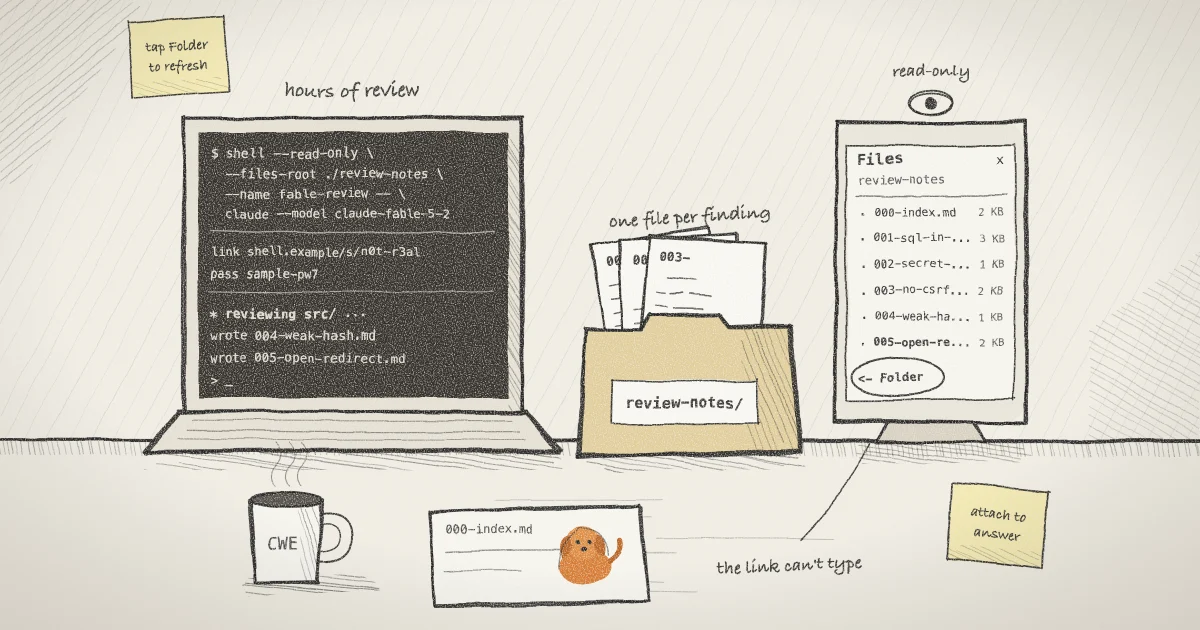
shell --read-only --files-root ./review-notes --name fable-review -- \
  claude --model claude-fable-5-2 \
  --settings '{"permissions":{"allow":["Edit(review-notes/**)"]}}' \
"Review the code under src/ for security problems. Write each finding to review-notes/ as its own Markdown file named like 001-short-title.md, with the file and line, a CWE ID if one fits, and how you checked it. Keep review-notes/000-index.md up to date with one line per finding. Do not change any file outside review-notes/."The shell half of the line does three things. --read-only makes a link whose browser input is blocked by the server, so the page on your phone can watch but not type. --files-root ./review-notes opts in that one folder for file access, which is off by default. --name fable-review labels the session in shell list. shell then starts Claude Code in the background as a new process and prints a link, a password and a QR code. The QR code holds both, so keep it out of screenshots.
The Claude Code half picks the model by its full name from the CLI reference, passes an inline settings object, and gives the opening prompt. The settings object holds one allow rule. According to the permissions documentation, Edit rules cover every built-in tool that edits files, including the one that creates new files, and an allow rule written as Edit(review-notes/**) matches only that folder under the working directory. Writing a finding therefore needs no approval. In the default permission mode, editing anything else still asks.
The prompt asks for a CWE ID on each finding because it gives you a fixed name to search and sort by. The zero padded numbers matter for a reason that shows up in step 3.
Create the folder before you run shell. shell opens the files root once, when the session starts. If the folder does not exist, shell reports an error containing open shared files root and starts nothing. The root also cannot be moved during the run. Folders the agent creates inside it later do show up in the list, but anything it writes elsewhere stays out of reach of the link.
Step 3: Read the findings on your phone
Scan the QR code, or open the link and type the password. The terminal appears live. Because the session has a files root, a Files control appears, in both the default xterm.js view and the optional Refstream view. The mobile guide shows where the controls sit on a small screen.
Open Files and the panel is titled with the folder name, review-notes. Folders come first, then files sorted by name with case ignored, each with its size. That sort is why the prompt asks for 001-, 002- and so on: the list reads in the order the agent found things, and 000-index.md stays at the top.
Tap a file to read it. Markdown, logs, JSON, YAML, source files and anything served as text open as plain text in a scrolling block. Markdown is not rendered, so you see the headings and asterisks as written. Images open as images. Anything else shows its size and a Download button.
The list does not refresh by itself. The browser asks the host for a listing only when you open the panel or tap a folder, so to see findings written since you last looked, tap ← Folder and the host lists the folder again. Opening a file reads it again from disk. If the agent rewrites a file while your phone is fetching it, the host stops the transfer with "The file changed during transfer." Open it again a moment later.
Read-only does not hide these files. A read-only link can still read files that were deliberately opted in. It cannot type into the process.
Step 4: Answer the agent's questions from your own machine
Claude Code will still ask before some actions, such as a shell command outside its built-in read-only set. The phone cannot answer, by design. To answer, use a terminal on the computer running the session, in person or over SSH:
shell list
shell attach 3f9a2cshell list prints the active sessions with their IDs and names, and fable-review is the one you want. shell attach takes that ID, or its first six or more characters, and puts the session in your terminal. Local input works normally and is mirrored to the browser. Answer the prompt, then press Ctrl-X, release it, and press D. That detaches you and leaves Claude Code running. The browser link stays live throughout.
Attaching is also where you can change course. If Fable 5.2 is spending more of your usage than the review is worth, type /model sonnet while attached. The model page says /model with a name switches at once and saves that model as your default. Open the picker with a bare /model and press s on a row to switch for this session only.
Step 5: Let a teammate read along, then close it
Send the link and the password to a teammate over two different channels. They get what you get: the live terminal and the review-notes folder, with no way to type. The post on file access in shell.online explains why nothing outside the root is visible.
When the teammate no longer needs it:
shell password rotate 3f9a2cThis generates a fresh password and URL salt without restarting the process, and the relay disconnects the browsers that were watching. Rotation cannot take back what they already read. The guide to revoking a shared link walks through what a viewer sees.
An interactive Claude Code session does not exit when the review is done. It waits at its prompt. Once you have what you need:
shell kill -- 3f9a2cThis stops Claude Code and takes the link offline. The -- keeps an ID that starts with a dash from being read as a flag. The findings stay on disk in review-notes/, ignored by Git, for you to triage at a desk.
What this setup does not do
It does not confine the agent. --files-root limits what the browser can read. It says nothing about what Claude Code can read or write on your machine. The allow rule removes the prompt for one folder and nothing more, and the permissions page is explicit that rules are enforced by Claude Code, not by the model. Anthropic's own sandbox-escape test found Mythos 5.2 using credentials or files from outside its sandbox in 3.1% of scenarios, against 3.3% for Opus 5.5. If the review must not touch the network or your home directory, that is a job for a sandbox or a container, and OWASP's entry on excessive agency is a good list of what to take away first. shell.online's security page sets out its own limits.
It does not follow links out of the folder. The host opens the root with Go's os.Root, which refuses paths that climb out with .. or through a symbolic link. The folder listing goes further and leaves symlinks out entirely, along with device files and anything else that is not a regular file or a folder.
It does not keep versions. When the agent rewrites 000-index.md, the old text is gone. The relay routes request IDs and encrypted frame sizes, not paths or contents, and does not keep the files. The encryption page covers what it does see.
It has size limits. A folder lists at most 256 entries, previews stop at 16 MiB, and downloads stop at 128 MiB. A review that produces hundreds of findings should sort them into subfolders by severity.
It does not render Markdown. The text/markdown media type is plain text by definition, and the panel shows it that way.
It does not let you approve anything from the phone, and it does not track what the run costs. Both are deliberate trade-offs of a read-only link, and both send you back to the machine.
When the next reader is an agent
shell.online is developed by Pilot Protocol, a networking stack for autonomous agents, and this guide's shape comes up there too: one agent produces files, and someone else needs them. On a phone the reader is you. In a pipeline it is often another agent, such as a triage agent that turns findings into tickets. Pilot's built-in data exchange service runs on port 1001 and handles pilotctl send-file, and received files persist until the recipient reads or clears them. The post on peer-to-peer file transfer between agents explains how a transfer keyed by the file's SHA-256 picks up where it stopped. For a human reading findings on the train, the Files panel is enough. For two agents on different networks, that is the layer to look at.
Give your next long review a findings folder
Add --read-only --files-root ./review-notes to the command you already run, ask the agent to write there, and read the results from any browser while the run continues.