How to Keep Secrets Out of Claude Code's Allow List in a Shared Terminal
Check what Claude Code's don't ask again option has saved, pass a shared session its secret by name, and see what shell.online does not filter.
Artemii Amelin10 min read
Contents
- What you need
- Step 1: Find out what is already saved
- Step 2: Put the value in the environment before the share starts
- Step 3: Start the share and refer to the secret by name
- Step 4: Decide who can press the option
- Step 5: If a value shows up on the link
- What this setup does not do
- Where Pilot Protocol fits
On November 5, Apiiro researchers Shmulik Cohen and Matan Giladi published a study of what Claude Code's "Yes, and don't ask again" option leaves behind. The figures here are Apiiro's, as reported by iTWire's summary of the research and iTnews's report on November 9. The option saves an allow rule to .claude/settings.local.json. If the rule records an exact command, any password or token typed into that command is stored with it in plain text.
Apiiro examined 104,185 public copies of that file and classified 1,122 of them as holding secrets, 1,379 distinct values in all. With older versions of the file, shared settings and saved agent transcripts included, the count reached 2,539 secrets across 1,994 repositories. Apiiro did not test whether the credentials worked, though one organisation it notified confirmed its key had been live. The complaint is old: a GitHub issue from August 2025 describes the same behavior and was closed as not planned after 60 days of inactivity. iTnews reports that Boris Cherny, who leads Claude Code, said on Hacker News that Anthropic is looking at prevention, including basic secret scanning, and that such measures might not fully solve it. iTnews's report mentions no shipped fix.
A shared terminal raises the stakes a little. On shell.online, anyone with an interactive link and its password can answer that prompt, possibly from a phone, and everyone watching sees the command as it is drawn. This guide checks what you have already saved, gives a Claude Code session a secret by name instead of by value, and states what shell does and does not do about the problem.
What you need
You need shell.online 0.25.0 or later (the CLI page has the installer and the source is in the GitHub repository), Claude Code, git and jq. The commands use macOS and Linux syntax. The statements below about how shell passes environment variables come from its Go source in that repository, on the Unix code path.
Step 1: Find out what is already saved
Do this from the repository root in a plain terminal on your own machine, outside any share. The output can contain the thing you are looking for.
git check-ignore -v .claude/settings.local.json
git ls-files .claude/settings.local.json
git log --all --oneline -- .claude/settings.local.jsonThe first command prints the ignore rule that covers the file and where that rule lives. Claude Code's settings documentation says it adds **/.claude/settings.local.json to your global git excludes the first time it writes the file, so that is the usual answer. git check-ignore prints nothing for a file that is not ignored, and also for one that is already tracked, which is why the second command is there. It prints the path if git tracks the file. The third lists every commit that ever touched it.
Next, count the saved rules that look like they hold a credential:
jq -r '.permissions.allow[]?' .claude/settings.local.json \
| grep -Ec 'Bearer |PASSWORD=|TOKEN=|API_KEY=|://[^/ ]+:[^/ @]+@'This prints a number and no rule text. On a test file holding one bearer token, one password in a database URL and two harmless rules it printed 2. A zero proves little. Among Apiiro's 1,122 files, iTnews reports that gitleaks flagged 564, TruffleHog flagged 643 and 215 were missed by both, so run gitleaks or TruffleHog if you like and then read the list yourself by dropping the grep.
If a rule holds a real credential, revoke or rotate it at the service first. GitHub's guide to sensitive data puts that first too, because history rewriting cannot reach clones and forks. Then delete the rule. If the file turned out to be tracked, stop tracking it:
git rm --cached .claude/settings.local.json
echo '.claude/settings.local.json' >> .gitignoreBoth lines are needed, since the gitignore documentation says files already tracked are not affected by ignore patterns.
Step 2: Put the value in the environment before the share starts
shell list
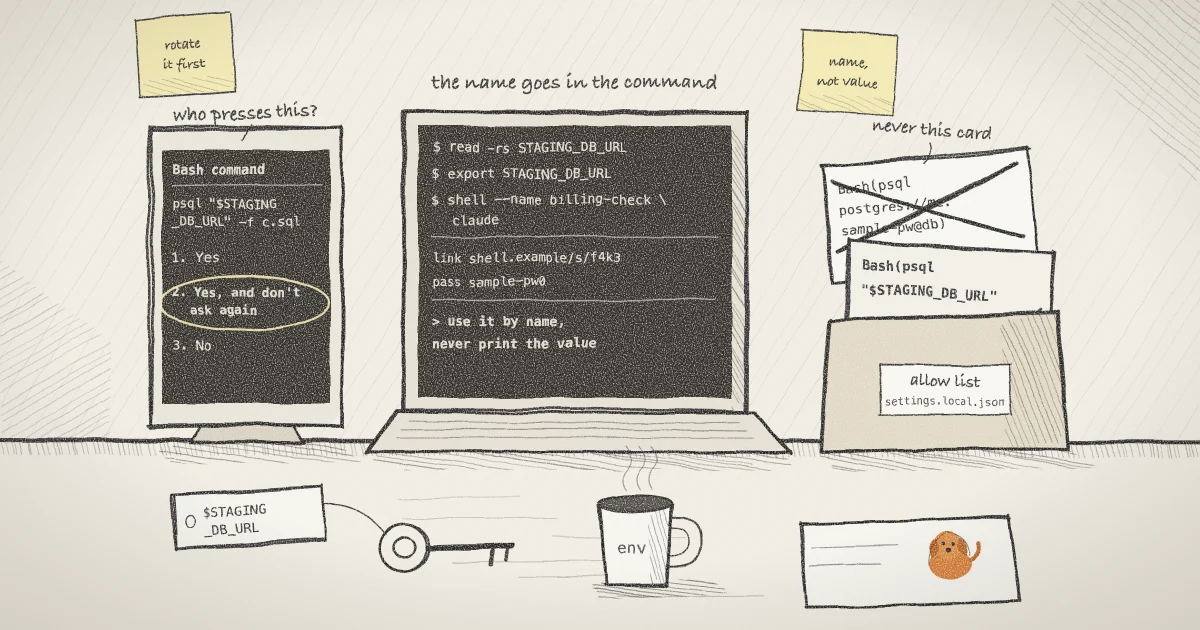
read -rs STAGING_DB_URL
export STAGING_DB_URLThe read builtin with -r keeps backslashes literal and with -s does not echo what you type. Paste the value, press Enter, and nothing appears. Typing export STAGING_DB_URL=... on one line would put the value in your shell history. iTWire warns of the same trap in approval rules: an inline assignment that carries the password still puts it in the command text.
The shell list at the top is deliberate. On a machine where you agreed to browser-started sessions, any ordinary shell command restarts the background daemon if it is down, and the daemon copies the environment of whichever command started it. Sessions started from the browser later inherit that environment. Running shell list before the export means a daemon starting at this moment does not hold your value. To see the state, run:
shell daemon statusIt prints Running. Your browser can start sessions on this machine. or Not running. Sessions can only be started from this terminal. A daemon started earlier from another terminal keeps whatever that terminal had exported.
Step 3: Start the share and refer to the secret by name
shell --name billing-check claudeshell prints a link and a ten-character password, then returns your prompt with Claude Code running in the background. It removes only its own internal variables from the environment it hands to the wrapped process, so Claude Code receives STAGING_DB_URL. Tell the agent to use the name:
Run scripts/check.sql against the database in $STAGING_DB_URL.
Refer to it by that name and never print its value.The command you should see in the permission prompt looks like psql "$STAGING_DB_URL" -f scripts/check.sql. If you choose "Yes, and don't ask again" there, the saved rule holds the name at most, because the value was never in the command. Anthropic's permissions page says a saved rule covers only what the option named, and that some prompts offer a one-time approval only. When that happens, approve once.
Read the prompt before you answer it. If the command contains the literal value, choose the plain "Yes" or refuse, and tell the agent to use the variable. Afterward, from your plain terminal, check what was saved:
jq -r '.permissions.allow[]?' .claude/settings.local.jsonThe file sits at the repository root, and in a worktree at the main checkout's root, so that is where to look. One setting can get in the way. If you run with CLAUDE_CODE_SUBPROCESS_ENV_SCRUB=1, Claude Code strips variables from Bash commands when the name or the shape of the value looks like a credential, and a database URL with a password in it is one of the documented examples. The command will then fail to find the value.
Do not paste the value into the browser terminal. Input from the browser goes into the conversation, and Claude Code keeps session transcripts in plaintext under ~/.claude/projects/ for 30 days by default. Apiiro's wider count included saved transcripts. If you use the shell.online app with a team, a line entered from the browser also goes to the team's audit log, sealed to the team's key, and that happens on Enter whether or not the program echoed the keystrokes. A prompt that hides your typing only keeps the value off the screen.
Step 4: Decide who can press the option
An interactive link lets anyone holding it and the password answer the prompt. If a teammate only needs to watch, start the session with a view-only link instead and answer prompts from your own terminal:
shell --read-only --name billing-check claude
shell list
shell attach 7f3a9cThe ID is invented; use the one shell list prints. The relay rejects browser input on a read-only session, your own browser included, and local input through shell attach still reaches the process. Press Ctrl-X, then D, to detach while it keeps running. The earlier post on read-only links covers why a viewer credential that cannot type is worth having.
Step 5: If a value shows up on the link
shell does not filter secrets out of terminal output. Whatever the process draws reaches every viewer, on a read-only link as much as an interactive one, and an agent holding an MCP observe grant receives it as plaintext. If the value appears on screen, rotate it at the service first. Then replace the session's own credentials if you are unsure who had them:
shell password rotate 7f3a9cThis generates a new password and URL salt without restarting the process and disconnects current viewers. Teammates' saved copies have to be shared again. The help text is direct about the limit: rotation cannot erase terminal output somebody already saw, and a value the agent printed will also be in its transcript. The post on revoking a link walks through this command in more detail.
When the job is finished, stop the process and clear the variable from the terminal that launched it:
shell kill -- 7f3a9c
unset STAGING_DB_URLOrder matters here too. unset changes only the launching terminal, and a session already running keeps its own copy until you stop it.
What this setup does not do
It keeps a value out of the rule file. It does not hide the value from the agent, which can run printenv whenever it has shell access. A comment in shell's own password_handoff.go notes that a process's environment is readable by every other process of the same user, which is why shell moved its session password out of the environment, as the post on that change explains. On Linux the access check for /proc/<pid>/environ is a ptrace check. The OWASP Secrets Management Cheat Sheet, in its section on containers, says environment variables may end up in logs or system dumps and recommends other methods where they exist. I would use this for a staging credential with a short life and keep production credentials out of any session a link can reach.
shell does not read or scan .claude/settings.local.json, and it does not change how Claude Code saves rules. End-to-end encryption keeps the value from the relay and does nothing about the people who hold the link and password, as the security page sets out. Auto mode, which Cherny recommended over permission rules, drops broad allow rules on entry but keeps narrow ones, and a literal command is a narrow rule, so an old entry stays where it is until you remove it.
A session started from the web app gets the daemon's environment. It will not have the variable you exported in a terminal, so start this kind of work from that terminal. You can still watch it from a phone.
Where Pilot Protocol fits
shell.online is developed by Pilot Protocol, and the idea behind a variable reference applies there as well: fewer places where a secret is written down. Per the Pilot concepts page, every node has a persistent Ed25519 identity keypair stored at ~/.pilot/identity.json, and trust handshakes are signed with it, so two agents agree to talk by signed exchange. That file is still a secret on disk and belongs in the same review as your settings files. Pilot's post on multi-cloud agent networks treats credential theft and lateral movement as serious threats in that layout, and its piece on rotating egress proxy credentials covers what happens to long-lived processes when a credential changes every few minutes.
Check the file, then send the link
Read what your allow list has saved, start the session with the value in its environment, and share the link once the rule file is clean.
Read the shell.online docs