How to Check Which Startup Hooks a Shared Claude Code Session Will Run
List the plugins and startup hooks your coding agents load, see the one hook shell.online adds to a Claude Code launch, and remove what you did not install.
Artemii Amelin10 min read
Contents
- What you need
- Step 1: List what Claude Code loads from your settings files
- Step 2: List what Codex has been told to trust
- Step 3: Start a read-only share and read its real launch line
- Step 4: Read the merged list inside the session
- What shell's own hook does
- Step 5: Remove what you did not add
- What this setup does not do
- The same question for Pilot Protocol
On October 24, version 12.33.4 of the Postman desktop app changed two coding agents on a developer's Mac without asking. According to the GitHub report filed the next day by a user named indicava, the app enabled a Postman plugin in ~/.claude/settings.json, added a Postman marketplace and plugin to ~/.codex/config.toml, and wrote a trust entry for its own session-start hook into that same Codex file. Notebookcheck's November 5 article adds later reports of entries in Cursor and the GitHub Copilot CLI, and says there is no evidence that Postman collected data this way.
A Postman staff member answered in the issue on November 5: "In the meantime, we are reverting this change." Notebookcheck points out that reverting does not remove what is already installed. The hook text itself is mild: it tells the agent to load a Postman skill before API work. The mechanism is what deserves attention. OpenAI's hooks documentation says Codex "requires you to review and trust the exact hook definition" before a non-managed hook can run, and Postman's install guide says of that step, "The installer approves the hook for you."
If you share an agent's terminal, a startup hook is worth knowing about because it runs before anyone reads the screen. This guide lists what Claude Code and Codex will load on your machine, shows the one hook shell.online adds to a Claude Code launch, and covers what to do when you find an entry you did not put there.
What you need
You need shell.online 0.25.0 or later (the CLI page has the installer, and the source is in the GitHub repository), Claude Code, and jq for reading JSON. Codex is optional. The commands use macOS and Linux syntax. The launch line in Step 3 was printed on macOS by running shell's own argument builder, whose code is unchanged since v0.25.0.
Step 1: List what Claude Code loads from your settings files
jq '{enabledPlugins, hooks}' ~/.claude/settings.json
jq '{enabledPlugins, hooks}' .claude/settings.json .claude/settings.local.json
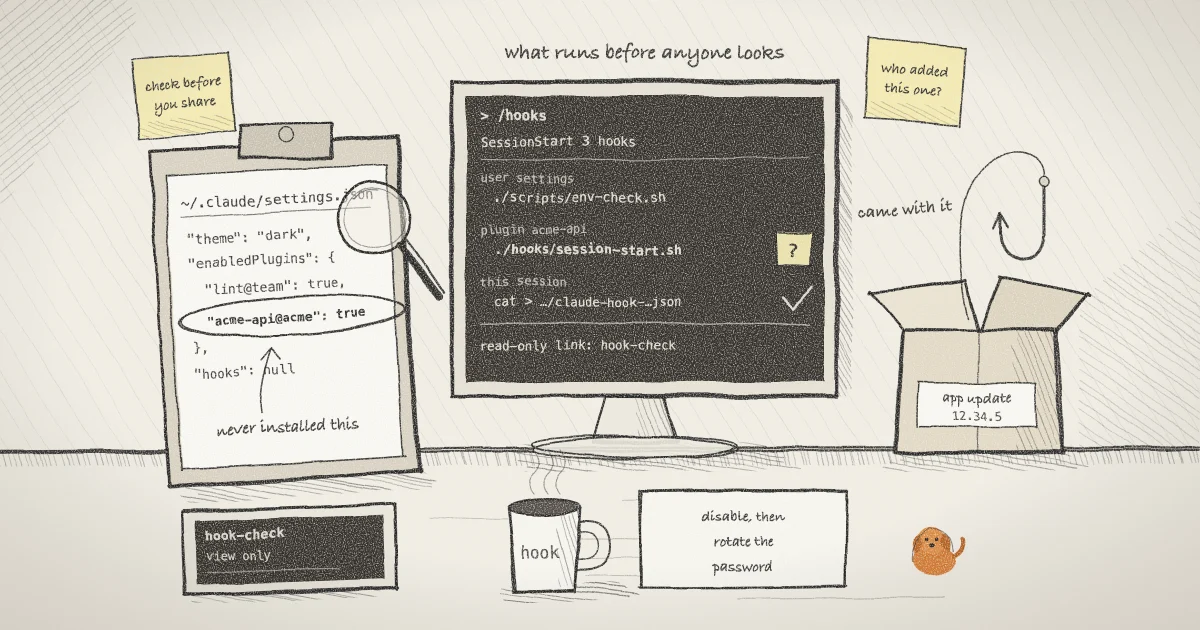
claude plugin listThe first command reads your user settings. The second reads the two project files, from the root of the repository you are about to work in. jq prints an error for a file that does not exist and carries on with the next one, so a missing project file is harmless. A key you have never set prints as null. On a machine touched by the Postman update, the first command would print something like this:
{
  "enabledPlugins": {
    "postman@claude-plugins-official": true
  },
  "hooks": null
}A hooks value of null does not mean no hooks will run. The Claude Code hooks reference lists plugins as a separate source, each with its own hooks/hooks.json, and says hook entries merge across settings levels instead of replacing each other. That is why the third command matters. claude plugin list shows the installed plugins, so you can compare them with what you remember installing.
Step 2: List what Codex has been told to trust
grep -n -E '^\[+(marketplaces|plugins|hooks)' ~/.codex/config.toml
ls ~/.codex/hooks.json .codex/hooks.json 2>/dev/nullThe grep prints only section headers, which keeps values out of your scrollback, and it also catches hooks defined inline in the file. The ls shows whether a separate hooks.json exists at user or project level. The sample below uses the section names from the Postman report, with invented line numbers:
12:[marketplaces.postman]
16:[plugins."postman@postman"]
19:[hooks.state."postman@postman:hooks/codex-hooks.json:session_start:0:0"]The third line is the one to look at. The report shows trusted_hash and trusted_content_hash under that header. OpenAI's documentation says Codex "records trust against the hook's current hash", and it does not spell out the section's key format, so treat the name as specific to the version in the report. A trust entry you do not remember creating means something approved that hook on your behalf. The /hooks command inside Codex shows the same sources and lets you review or disable non-managed hooks.
Step 3: Start a read-only share and read its real launch line
The settings files tell you what Claude Code will read. The process table tells you what it was actually started with, including anything the launcher added.
shell --read-only --name hook-check claude
shell list --json | jq -r '.[] | select(.name == "hook-check") | .pid'
ps -ww -o command= -p "$(pgrep -P 48213)"The first command starts Claude Code in the background and prints a browser link and a ten-character password. --read-only makes the relay reject browser input. The second command prints the pid of the shell host, shown here as an invented 48213. Filter it this way because the full JSON record also holds the session password. The third command finds the host's child with pgrep -P and prints its whole argument list with ps -ww, which removes the width limit.
On a machine linked to an account with shell auth, the result looks like this, on one line, with the first word possibly a full path:
claude --settings {"hooks":{"SessionStart":[{"hooks":[{"command":"cat > '/tmp/shell-online-501/claude-hook-48213-3928457.json'","type":"command"}]}]}} --session-id 81b23ff5-a70b-4b2a-9f96-f5f50ad73575The > is an escaped >, so the hook is cat > file. On a machine that was never linked, shell adds nothing and the line is just claude.
Step 4: Read the merged list inside the session
The browser cannot type into a read-only session, but a local attach can.
shell list
shell attach 7f3a9cshell list gives you the session ID, and shell attach accepts an unambiguous prefix of at least six characters. Once attached, type /hooks. The hooks reference describes this as a read-only browser that labels each hook with where it comes from and shows the full text of what it runs. Look under SessionStart. shell's entry is the one whose command starts with cat > and points at a claude-hook- file. Anything else came from elsewhere in your setup, such as your settings, your project or a plugin, and now you can read it. Close the list, then press Ctrl-X, release it, and press D to detach. The process keeps running, and anyone holding the link saw the same screen.
What shell's own hook does
shell passes this hook on the command line, once, for that process. The Claude Code settings documentation says --settings "lasts one session and doesn't write to any file". The CLI source has no write to ~/.claude or ~/.codex at all. It reads Claude transcripts to write summaries.
The hook exists for session summaries in the web app. Claude Code hands every SessionStart hook its session ID and transcript path, and writing that to a file lets the summary follow the conversation through /clear and /resume. Summaries stay off until you run shell permissions <ID> --summaries=true, but the hook is added on every linked launch either way, so it will appear in your list even if you never use them.
- The file lives in
/tmp/shell-online-<uid>/, a directory set to mode 0700, and the file itself is 0600. - shell deletes it when the session ends. If the host was killed, the next Claude Code session you start through shell removes the leftover.
- No hook is added for
claude -p, for subcommands such asclaude mcp, or for a single bare word such asclaude fix, which shell cannot tell from a subcommand. - If you pass your own
--settings, shell leaves its hook out and keeps only the--session-id, so a summary will not follow/clear. - On Windows no hook is added, and a fresh launch gets only the
--session-id.
Owner-only files do not protect you from a hook. A hook is a process your own account starts, and shell list --json prints the link and password of every local session to any process running as you. shell has kept the password out of the wrapped program's environment since 0.24.1, which closes one route and leaves this one. If you find a hook you do not trust on a machine with live shares, remove it first, then run shell password rotate <ID> for each session.
Step 5: Remove what you did not add
npx @postman/postman-plugin status
npx @postman/postman-plugin remove --dry-run
claude plugin disable postman@claude-plugins-official
shell password rotate 7f3a9c
shell kill -- 7f3a9cThe first two lines apply only to the Postman case: status lists the agents the plugin detects, and Postman's guide documents remove with a --dry-run preview. Run remove again without the flag once the preview looks right. For any other Claude Code plugin, claude plugin disable turns it off, and claude plugin uninstall deletes it. In Codex, use /hooks to disable a non-managed hook.
shell password rotate issues a fresh password and URL salt without restarting the process and disconnects current viewers. It cannot erase output somebody already saw. Revoking a shared link covers that in more detail. shell kill stops the process and closes the link, which is the simple choice for a session you started only to run this check. Use one or the other: rotate a session you want to keep, and kill one you do not.
What this setup does not do
shell does not inspect, filter or sandbox plugins and hooks. --read-only limits what a browser can type, as the earlier post on read-only links explains, and it places no limit on what a hook or the agent can do on your machine. The security page describes what the relay can and cannot see, and none of that reaches into your local processes.
A viewer sees what the terminal draws. A hook that prints nothing leaves nothing on the link, so watching a session is no substitute for the list in Step 1.
The check is also a snapshot. The settings documentation says Claude Code reloads its settings files while running, including edits to hooks, so a clean list at launch does not cover a file that changes mid-run. Repeat the check after installing or updating any tool that advertises agent support.
Nothing here shows that Postman's plugin caused harm. A hook that fires on an event is a normal feature, and the same shape appears in MITRE ATT&CK as Event Triggered Execution. What separates the two is who decided to add it. For the wider set of risks, the OWASP Top 10 for Agentic Applications is the reference I would start with.
The same question for Pilot Protocol
shell.online is developed by Pilot Protocol, so the same test applies there. The Pilot daemon writes a skill file and a heartbeat directive into agent configuration directories, including a marked block in ~/.claude/CLAUDE.md. That is on by default. The consent page says so, and pilotctl skills set-mode disabled stops the injection and removes every file it wrote. If you run Pilot, add that block to your list in Step 1.
Between agents, Pilot uses an explicit agreement instead of a config write. Its post on zero trust for agent communication describes a handshake both sides must accept, with a stated reason the reviewing operator can read and revocation from either side. That covers who may connect. As the post says, it does not cover tool permissions, so the checks above still apply.
Read the launch line before you send the link
Install shell.online, start your agent with --read-only, and check what it loaded before anyone else opens the session.