How to Keep a Shared Agent Terminal's Password Apart From Its Link
Choose your own session password, send it apart from the link, open it in an ordinary browser, and know when the QR code and copy button carry it too.
Artemii Amelin10 min read
Contents
- What the link and the password each do
- Step 1: Choose the password yourself
- Step 2: Send the link and the password on different channels
- Step 3: Open it in an ordinary browser, and read the address bar
- Step 4: Treat the QR code and the copy button as carrying the password
- Step 5: Rotate when the password went somewhere it should not
- What this setup does not do
- Where Pilot Protocol fits
On October 29, Gal Weizman of Forever Security published EMBRACE, a technical write-up on the browsers built into five desktop AI assistants: Cursor, GitHub Copilot, Claude Desktop, VS Code and Codex. Each app extends its embedded browser past what an ordinary browser allows. In Cursor, a page could push instructions into the agent's composer. In Copilot 1.1.27, a page could report any address to the app, so the address bar showed a github.com login URL over an attacker's page; GitHub fixed that in 1.1.29. In Claude Desktop, VS Code and Codex, a local page could read files outside the project, in two of them by starting a web worker that the folder restriction did not cover. The Register reported the same day that the Codex and VS Code issues were still unpatched, and Hackread's account gives the same disclosure dates.
The sentence from the write-up worth keeping is "A normal browser treats every page as hostile." The flaws are in the editors, not in anything you share. But they are a reminder that where you open a link, and where you type a secret, decides who else can see it. If you share a coding agent's terminal from your own machine, the browser is where your teammate types the key to it.
A shell.online share is two secrets: a link and a password. This guide sets your own password for a sensitive run, sends the two pieces separately, opens the link in a browser whose address bar you can trust, and covers the two places where the password quietly travels with the link: the QR code and the viewer's copy button. Then it rotates the password when one of them went somewhere it should not have.
What the link and the password each do
Every new share is end-to-end encrypted by default. The printed link ends in a fragment, #salt= followed by 22 random characters. The password is printed next to it, on its own line. The CLI and the browser each derive the same AES-256-GCM key from the two with PBKDF2-HMAC-SHA256 at 600,000 iterations, the function defined in RFC 8018. That iteration count is the one OWASP's password storage cheat sheet recommends for that variant.
The fragment matters because of how URLs work. RFC 3986 says the fragment is dereferenced solely by the user agent, and MDN puts it plainly: the fragment is not sent to the server when the URI is requested. The relay at shell.online routes ciphertext. It still sees timing, addresses, encrypted sizes, labels and the terminal's grid dimensions, as the encryption page lists, and the earlier post on what the relay sees goes through each item.
So the link alone opens a password prompt, and the password alone opens nothing. The viewer says so: a link with its fragment cut off shows "This link is incomplete", and adds that a password alone cannot open it. Together they give whatever access the session has, which for a normal share is view and type.
Step 1: Choose the password yourself
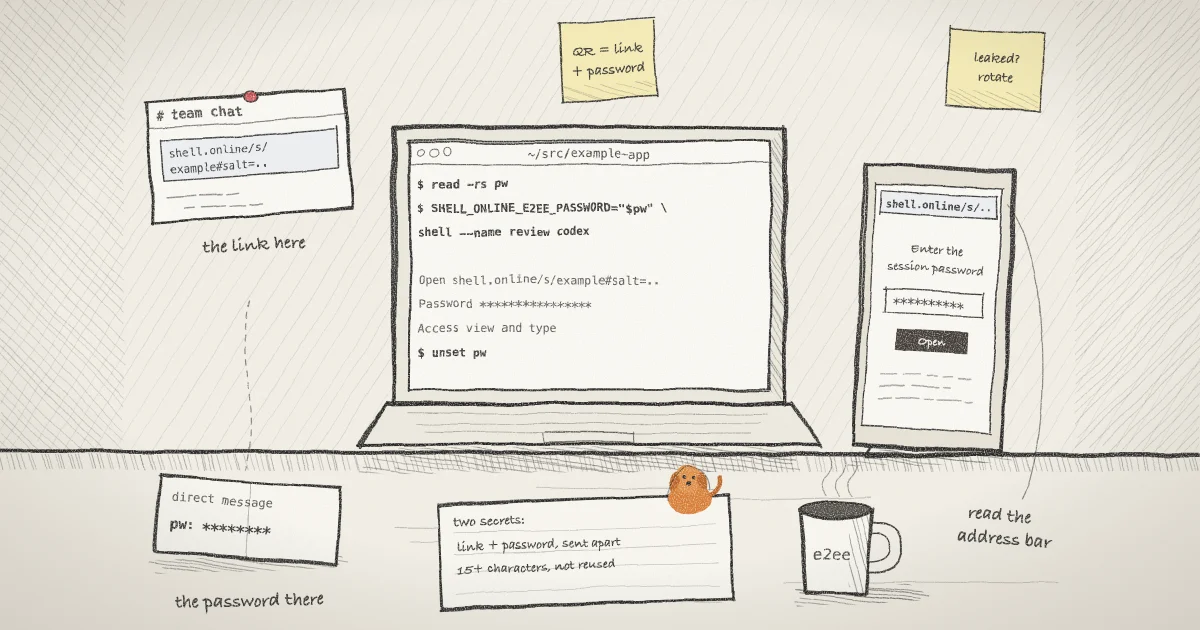
The generated password is ten characters from a 64-symbol URL-safe alphabet, which is 60 random bits. The CLI help suggests choosing a longer one for sensitive or long-lived work, and an agent session that can push to a repository qualifies. You set it with SHELL_ONLINE_E2EE_PASSWORD. To keep it out of your shell history, read it without echo first. These commands are for bash or zsh on macOS or Linux:
read -rs pw
SHELL_ONLINE_E2EE_PASSWORD="$pw" shell --name review codex
unset pwThe first line waits for you to type the password and prints nothing. In the bash builtins reference, -s is silent mode and -r stops backslashes acting as escapes. The second line starts Codex in the background under the name review and prints a session card that includes these lines:
  Name       review
  Open       https://shell.online/s/example-session-id#salt=example-salt
  Password   (the password you typed)
  Vault      not linked · run shell auth
  Access     view and type · end-to-end encrypted
Session a1b2c3d4e5 · backgroundThe variable is set for that one command. Since 0.24.1, shell hands the password to its own background process over a pipe rather than in an environment variable, and on Unix the wrapped program's environment has the variable removed, so Codex cannot read it from its environment.
Two rules apply to what you type. The CLI rejects an empty password, one over 1,024 bytes, and one containing control characters. It does not enforce a minimum length, so a four-letter password is accepted. Length is your decision. NIST SP 800-63B requires at least 15 characters for a password used as a single factor, which is a reasonable floor here too, since nothing else stands between the link and the terminal.
Step 2: Send the link and the password on different channels
The printed link has no password in it. That is deliberate, and the card says what to do with it: "Open the full link, then enter the password above." Put the link in the team chat and the password in a direct message, or read the password out on a call. Someone who sees one channel then has half of what they need. The older post on sharing a session password with a teammate covers the account vault, which can hold a sealed copy for teammates instead.
If you lose the password, ask the machine, not the service:
shell list
shell password a1b2c3d4e5shell list prints the session IDs and whether a password is stored. shell password takes an ID or a prefix of at least six characters and prints that session's password from its owner-only local record. Without that record or a vault copy, the password is gone, and the help text says E2EE has no recovery backdoor by design.
Step 3: Open it in an ordinary browser, and read the address bar
The viewer asks for the password in a field that says it is the session password, not your account password, and that it is never sent to shell.online. The key is derived in that tab. That makes the tab the thing to trust. EMBRACE showed one embedded preview whose address bar could display a URL the page chose, and three whose pages could read local files. Those are exactly the properties you rely on when you type a secret into a page.
So open the link in Safari, Chrome or Firefox, not in an editor's built-in preview pane, and check that the address bar reads shell.online before you type. Do not paste the link and password into an agent's chat so it can open the session for you either: the agent then has both, and so does its transcript. If your team opens untrusted repositories in VS Code, Workspace Trust is worth turning on; Microsoft classed the VS Code file-read report as gated by it.
Step 4: Treat the QR code and the copy button as carrying the password
When the card goes to an interactive color terminal, it ends with a QR code under the words "Scan to open" and "includes the link + password", followed by a line that says anyone who scans it can view and type in the session. The code is the link with &password= added to the fragment, so a phone opens the session in one scan. The relay still never receives the password, but anyone who can see your screen can scan it. Close the terminal tab or clear the screen once your phone is in.
The CLI leaves the QR out in two cases. It is skipped when the output is not a color terminal, for example with NO_COLOR set, TERM=dumb, or output piped to a file. It is also skipped when the code would be more than 57 modules wide, which a very long password can cause. If the QR is missing, type the link and password on the phone instead.
In the viewer code at this commit, the "Copy sharing link" button copies the page's own address, and the page does not remove the password from the address after it reads it. If you opened the session by scanning the QR, the link you copy from that phone includes the password, and the full address sits in that browser's history. Copy links from the CLI's card or from shell list --json instead, where the link has only the salt.
Step 5: Rotate when the password went somewhere it should not
If the password landed in the wrong chat, or you scanned the QR in a meeting room, change it without stopping Codex. To choose the new one yourself, set the variable again:
read -rs pw
SHELL_ONLINE_E2EE_PASSWORD="$pw" shell password rotate a1b2c3d4e5
unset pwWithout the variable, shell password rotate generates a fresh ten-character password. Either way it prints the new Link: and Password:, then "Existing viewers were disconnected. Share the new link and password." The salt changes too, so the old link stops working along with the old password. The host switches to the new key before the relay drops current viewers, so input under the old key is rejected. The encryption page adds that rotation revokes old MCP grants and updates your vault copy, and teammates who had a sealed copy need it shared again. The earlier post on revoking a link without killing the process walks through the same command, and the security page sets out the wider model.
What this setup does not do
- It does not fix your editor. The EMBRACE issues live in the assistants' embedded browsers, and only their vendors can close them.
- It does not stop someone who has both pieces. Anyone with the link and password can view and type, or only view on a
--read-onlyshare. The password is a bearer credential, not an identity. - It does not hide metadata. The relay sees when you type, how much the screen changes, and the grid size.
- It does not apply to
--no-e2eesessions, where the relay can read the terminal, or to MCP grants, which let the server decrypt in memory for the grant's lifetime. The agents page explains grants. - It does not keep the password from the agent itself. Codex runs as you, and
shell passwordandshell list --jsonprint passwords to any process running as you on that machine. - Rotation cannot take back what a viewer already saw.
Where Pilot Protocol fits
A shared password is the right tool for a person on a phone who has nothing installed. Agents talking to each other do not need one. In Pilot Protocol, the networking stack from the team that builds shell.online, every node holds a persistent Ed25519 identity key and tunnels are encrypted with an X25519 exchange and AES-256-GCM, as the Pilot security docs describe, so there is no password to send in a second channel. Pilot's guide to encryption protocols for AI systems makes the case for layering protections and rotating keys rather than relying on one algorithm. If your agents need to reach each other across machines, Pilot Protocol is where that starts.
Share the next agent run with a password you chose
Install the CLI, start your agent with SHELL_ONLINE_E2EE_PASSWORD set, and send the link and the password on two different channels.
Get shell.online on GitHub