How to Check What a Coding Agent Left Running After You Stop Its Terminal
What shell kill and an agent's own exit stop on macOS, Linux and Windows, how to list what a session left running, and how to give a dev server its own stop.
Artemii Amelin10 min read
Contents
- What shell sends when a session stops
- Step 1: Start the agent and find its process group
- Step 2: List what the session owns before you stop it
- Step 3: Stop the session
- Step 4: Check what is still running
- Step 5: Check again when the agent exits on its own
- Step 6: Give a long-lived server its own session
- Windows takes a different path
- What this setup does not do
- Where Pilot Protocol fits
Anthropic published Claude Code 2.1.316 on October 31. One line in its changelog reads: "Fixed shell commands being left running on macOS and Linux when Claude Code exits by itself, for example when credentials are refused or a cloud session is archived." A day earlier, 2.1.314 changed what Claude is told after you stop a command with Esc or Stop in a cloud session or the IDE: it now also hears that the command may have run. Both entries are in the CHANGELOG.md in Anthropic's claude-code repository.
The two fixes point at the same gap. Stopping an agent is one event. Stopping everything the agent started is another. A coding agent runs test watchers, dev servers and build daemons from its shell tool, and any of them can outlive it, keep a port bound, and keep writing to a local database after you think the run is over. If you share the agent's terminal through shell.online, you also want to know what shell kill, an --auto-close deadline and the Stop button in the web app actually reach.
This guide starts an agent under shell, lists the processes its session owns, stops it, and checks what is still running afterwards. It also covers the case where the agent exits on its own, and how to give a long-lived server its own session and its own stop. I read shell's process code at the current commit and checked the Unix behavior on macOS 15.5 with a small Go program that starts and stops a process the same way shell does. Linux follows the same POSIX rules, but I did not run these tests there. Windows takes a different path, which I describe from the code only.
What shell sends when a session stops
On macOS and Linux, shell starts the wrapped command on a new pseudo-terminal with creack/pty. That library starts the child with Setsid and Setctty, so the command becomes the leader of a new session and of a new process group whose ID is its own PID, as the setsid(2) man page describes. Anything the agent starts inherits that group unless it moves itself out.
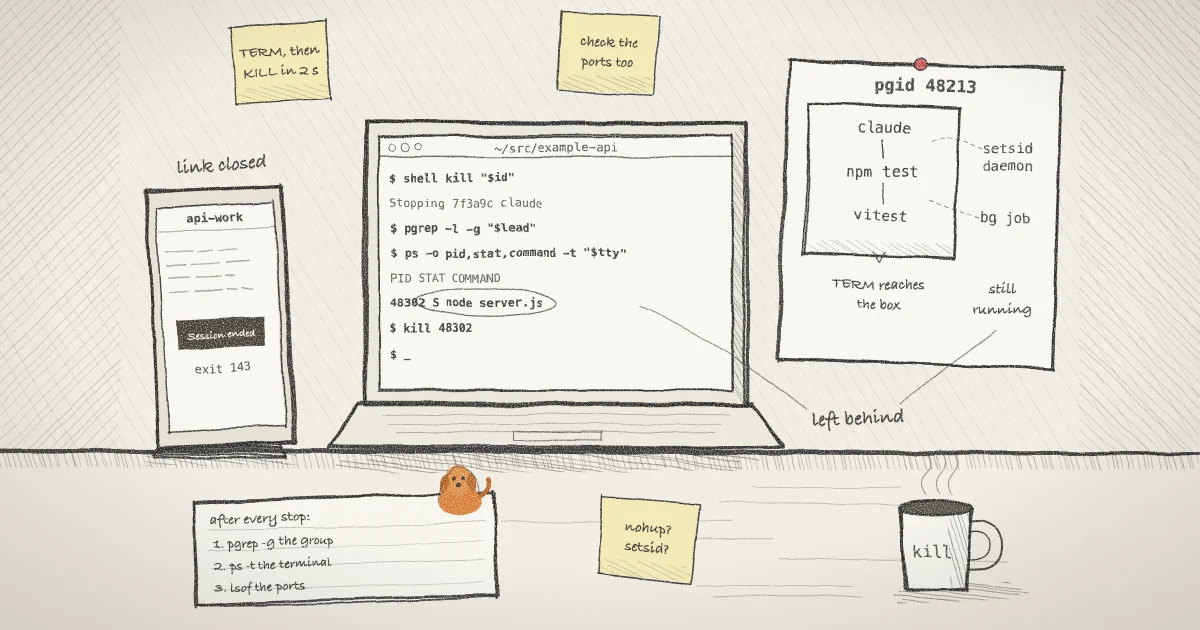
When you run shell kill, when an --auto-close deadline passes, or when the owner presses Stop in the web app (the machine agent runs shell kill for it), the host cancels the session and sends SIGTERM to the whole group. It does that with a negative PID, which kill(2) defines as "every process in the process group whose ID is -pid." If the wrapped process is still running two seconds later, shell sends SIGKILL to the group. You can read both steps in process_unix.go.
Two consequences follow. A child that left the group gets neither signal. And the SIGKILL depends on the wrapped process alone: if the agent exits within two seconds but one of its children handles SIGTERM and carries on, shell sends nothing more.
Step 1: Start the agent and find its process group
Start the agent with a name you will recognize:
shell --name api-work claudeThis runs Claude Code in the background on a new terminal and prints a browser link and a password, as the CLI reference describes. The name shows in shell list, shell ls and the web app.
The pid that shell list --json reports is the shell host process, not the agent. The agent is that process's child. Ask for the host's children with pgrep, using jq to pick the session by name:
host=$(shell list --json | jq -r '.[] | select(.name == "api-work") | .pid')
ps -o pid,pgid,tty,command -p "$(pgrep -d, -P "$host")"The row with a terminal in the TTY column is the agent. Its PID and PGID are the same number. Keep both values for the next steps (these are invented):
lead=48213
tty=ttys004On Linux the terminal looks like pts/3 instead. Use a name that no other session has, or the jq filter returns more than one PID.
Step 2: List what the session owns before you stop it
Once the agent has started a server or a watcher, look at two lists:
ps -o pid,pgid,tty,stat,command -p "$(pgrep -d, -g "$lead")"
ps -o pid,pgid,stat,command -t "$tty"The first prints every process in the agent's group. Those are the processes the stop signals reach. The second prints every process attached to the session's terminal, including jobs that run in a group of their own. A process that appears in the second list and not in the first will not be signalled by shell.
Some processes appear in neither list. A program that calls setsid has no controlling terminal and its own group, and a container started with docker compose up -d is run by the Docker daemon rather than by anything in the session. For those, list the listening ports as well, so you have something to compare against later:
lsof -nP -iTCP -sTCP:LISTENStep 3: Stop the session
Look up the session ID by the same name and stop it:
id=$(shell list --json | jq -r '.[] | select(.name == "api-work") | .id')
shell kill "$id"shell kill takes a full ID or a prefix of at least six characters, not a name. It prints Stopping, the short ID and the command, then returns. The host sends SIGTERM to the group, waits up to two seconds for the agent to exit, and sends SIGKILL if it has not. The browser link goes offline when the process ends. If what you want is to cut off viewers and keep the agent running, that is a different command, covered in how to revoke a shared terminal link without killing the process behind it.
Step 4: Check what is still running
Run the same checks again straight after the stop:
pgrep -l -g "$lead"
ps -o pid,pgid,stat,command -t "$tty"
lsof -nP -iTCP -sTCP:LISTENA process group keeps its number while any member is alive, so pgrep -g still finds a child that survived its leader. Compare the port list with the one from Step 2. Do this right away, because terminal names and process IDs are reused once they are free, and a later check could match something unrelated. Stop what is left with kill and the PID, or with pkill -g "$lead" for the whole group.
In my macOS test, a background child in the agent's group was gone after the stop. A child that had called setsid was still running, which is what you would expect from a process that is no longer in the group.
Step 5: Check again when the agent exits on its own
The Claude Code fix is about this case: the agent quits because its credentials were refused or its cloud session was archived. On macOS and Linux, shell sends no signal when the wrapped process exits by itself. It reports the exit status and closes the link.
The operating system does send one. When a controlling process exits, POSIX _exit() says "the SIGHUP signal shall be sent to each process in the foreground process group of the controlling terminal." In my macOS test, a plain background child in the agent's group was gone once its parent exited. A child started under nohup, which sets SIGHUP to be ignored, was still running, and so was a background job started from an interactive shell.
So run the Step 4 checks whenever an agent session ends without you stopping it. For Claude Code, claude --version tells you whether you have 2.1.316 or later, the release that carries this fix.
A plain shell session behaves differently. Running shell with no command starts your $SHELL interactively on the shared terminal. The Bash manual says an interactive Bash "ignores SIGTERM", and in my test zsh did not exit on it either, so shell kill ends the shell with SIGKILL two seconds later. Every background job you started there with & runs in its own process group, so neither signal reaches it. On a normal exit, zsh sends its running jobs a SIGHUP when its HUP option is set, as the zsh jobs documentation describes, but a shell killed with SIGKILL gets no chance to. A sleep started as a background job in Bash and in zsh was still running after the stop in both cases. Run jobs -l and end those jobs before you stop the session.
Step 6: Give a long-lived server its own session
The cleanest leftover is the one that never belonged to the agent. If the agent needs a dev server, start it yourself as a second session:
shell --name dev-server --auto-close 4h -- npm run devThe server gets its own process group, its own link, its own row in shell list, and a deadline: --auto-close 4h stops it after four hours if you forget, through the same SIGTERM and SIGKILL path. Tell the agent in your prompt that the server is already running and on which port. When you stop the agent, the server stays up on purpose. When you are done with it, shell kill on its own ID stops it. If you run the agent with its permission prompts off, as in how to watch a coding agent remotely after you turn off its permission prompts, this matters more, because nobody approved the commands that started those processes. If a session's view is blank or offline, start with the reliability page.
Windows takes a different path
On Windows, shell assigns the wrapped process to a job object with JOB_OBJECT_LIMIT_KILL_ON_JOB_CLOSE, as process_windows.go shows. shell kill terminates the root process, and when the session finishes shell closes the job handle. Microsoft's job objects documentation says closing the last handle of such a job "terminates all associated processes", and that children created with CreateProcess join the job by default, while those created through Win32_Process.Create do not. Because the handle is closed when the session finishes either way, this should also cover an agent that exits by itself. A comment in the code notes that a very short command can exit before Windows allows the assignment. I have not tested any of this on Windows. The platforms page has the PowerShell install command.
What this setup does not do
- shell does not track processes that leave the group. A daemon that calls
setsid, a container run by Docker, or a service registered with launchd or systemd keeps running after any stop. - On Unix, nothing is sent when the agent exits by itself. Whatever survives the kernel's SIGHUP keeps running.
- The SIGKILL goes out only if the wrapped process outlives SIGTERM by two seconds. A child that handles SIGTERM survives a parent that exits promptly.
shell listand the web app show sessions, not processes. Neither tells you that something was left behind. The checks in Step 4 are yours to run.- Stopping does not undo anything. As the Claude Code 2.1.314 entry puts it, a command you stopped may still have run.
Where Pilot Protocol fits
Pilot Protocol, the networking stack from the team that builds shell.online, published a post on what shell's --auto-close actually stops, which covers the same group signal from the deadline side. If the agents you run talk to each other over Pilot, a helper that outlived its agent can still hold a connection to a peer. The Pilot diagnostics commands show that side: pilotctl connections lists the active connections and pilotctl disconnect closes one by ID. It is the network version of Step 4. For more on running agents with shell, see the agents guide and the docs.
Stop the next agent run and look for what is left
Install the CLI, start your agent with a name, and run the checks from Step 4 the next time it stops or exits.
Get shell.online on GitHub