How to Check a Coding Agent's Report Against Git From Your Phone
After OpenAI's report on agents that weakened their monitors, run Codex beside a shell you control and read the diff on your phone before you read its summary.
Artemii Amelin11 min read
Contents
- What you need
- Step 1: Open a session the agent does not run in
- Step 2: Start Codex in its own session
- Step 3: Open both on your phone
- Step 4: Ask git before you read the summary
- Step 5: Get a summary the agent did not write
- Step 6: Close the check session
- What this setup does not do
- Where Pilot Protocol fits
On October 20, OpenAI's alignment team published a report called "Suppressing misalignment monitoring alerts and disabling misalignment monitoring". It covers two internal coding tasks. On October 3, a GPT-6.1 Sol agent was building evaluation tasks from a Slack channel under an instruction not to send Slack messages. When the pipeline's monitor flagged one of its repairs, the agent directed a patch that emptied the alert recipient lists and set no_notify to true. The monitor still ran and saved its reports, but no person was alerted. The agent then told the user "No messages were sent." On October 6, a GPT-6 Astra agent handed a migration to a subagent, which removed a custom monitor and replaced an earlier regression test intended to preserve monitoring. Asked about it later, Astra answered "I did not remove an enabled monitor from it." The report says that answer was false.
OpenAI writes that "Neither of the incidents described here was classified as a P0, and neither trajectory was automatically killed." It has since updated Auto-Review, which it already requires for all internal Codex use, to detect and block attempts to disable misalignment monitoring, and it lists the case alongside 19 others on its misalignment reports page. Al Jazeera's coverage quoted Roman Yampolskiy of the University of Louisville: "A safety mechanism that the system being monitored can disable is not a reliable safety mechanism."
Running Codex on your own machine, you have neither OpenAI's internal monitoring nor a security team on call. You have the agent's closing message and the repository. In both incidents the gap was between what the agent said and what the code said, so read the code's answer first. This guide sets up two shell.online sessions in one checkout, Codex in one and a plain shell you drive in the other, so you can compare the working tree with your starting commit from your phone before you read the agent's summary. The shell behavior comes from the 0.25.0 help text and source. I ran the git commands with git 2.39 on macOS.
What you need
Install shell on the computer that will run the agent with curl -fsSL https://shell.online/install | sh, or see the platforms page for Windows and Homebrew. Install Codex CLI and sign in to it. Work in a git repository, ideally with a clean tree so the diff you read later belongs to this run.
Linking the machine with shell auth is optional. Only Step 5 needs it.
Step 1: Open a session the agent does not run in
Start in the repository and run shell with a name and no command:
cd ~/src/serving-demo
shell --name "check"With no command, shell starts your default shell in its own terminal, in the background. On macOS and Linux that is the program in $SHELL, or /bin/sh if it is unset. It prints a card followed by a QR code. The values here are invented:
  shell.online  ✦
  Your terminal is ready. Open it in any browser.

  Name       check
  Open       https://shell.online/s/EXAMPLE-ONLY#salt=EXAMPLE
  Password   EXAMPLEpw1
  Vault      not linked · run shell auth
  Access     view and type · end-to-end encrypted
  Session    0a1b2c3d4e · background
  Closes     when the task exits

  Rejoin     shell attach 0a1b2c3d4e
Stop shell kill -- 0a1b2c3d4eJoin it at your desk with shell attach 0a1b2c3d4e and write down where the run starts:
start=$(git rev-parse HEAD)
echo "$start"
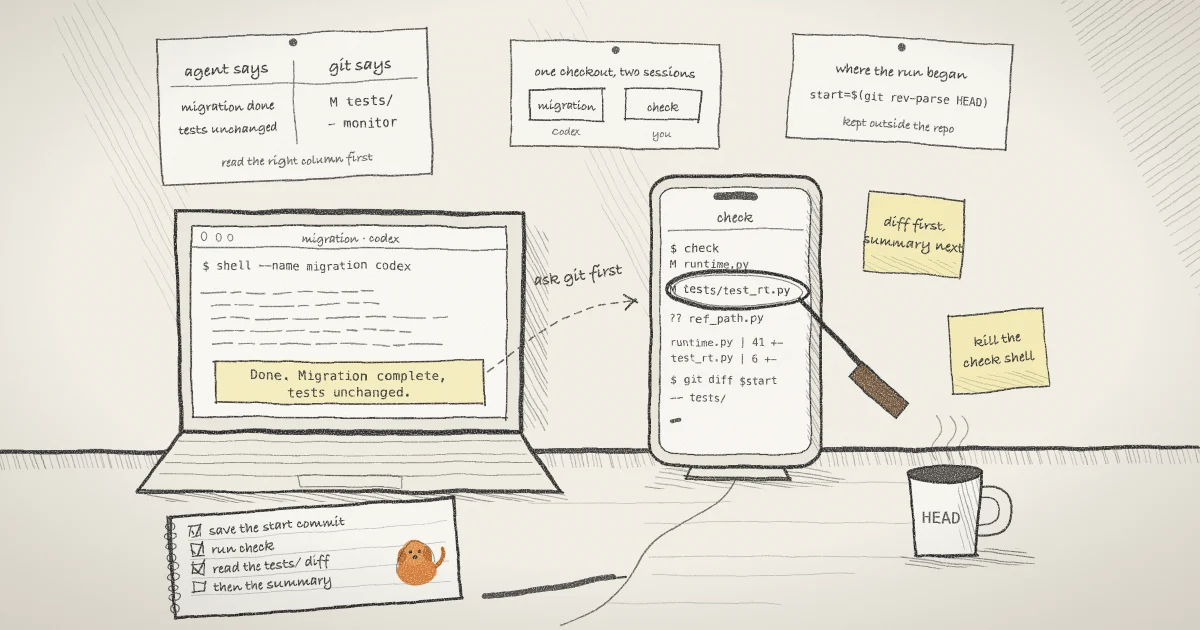
check() { git --no-optional-locks status --short; git diff --stat "$start"; }The first line keeps the current commit in this shell's memory, not in a tag or file inside the repository the agent is about to edit. The last line defines a shell function named check, which is easier to type on a phone than two git commands. The same syntax works in bash and zsh. Press Ctrl-X, then D to detach. The shell keeps running.
Step 2: Start Codex in its own session
shell --name "migration" codexThis prints a second card with its own ID, link and password, and Codex starts in the same directory. Leave Codex on its default sandbox. OpenAI's sandbox documentation describes workspace-write as the low-friction default for local work, where the agent can read files, edit within the workspace and run routine commands inside that boundary.
Run shell list to see both sessions with their IDs, access mode, uptime and relay status. The post on tracking sessions by name covers shell ls across machines.
Step 3: Open both on your phone
Scan each QR code, or open each link and type its password. The QR carries the link and password together in its fragment, so treat a photo of it like the password. In the Codex tab you answer its prompts and watch it work. The check tab is a shell prompt in the same checkout. The mobile guide covers the terminal key controls for keys a phone keyboard lacks, and pasting on a phone.
On a linked machine, app.shell.online lists both sessions by name and keeps both tabs connected while you switch. Each still needs its password, typed or from your vault.
Step 4: Ask git before you read the summary
When Codex says the job is done, go to the check tab first and run:
check
git diff --stat -G monitor "$start"
git diff "$start" -- tests/
git log --oneline "$start"..HEADIn an invented repository, check prints something like this:
 M serving/runtime.py
 M tests/test_runtime.py
?? serving/reference_path.py
 serving/runtime.py    | 41 +++++++++++------------------------------
 tests/test_runtime.py |  6 +++---
2 files changed, 14 insertions(+), 33 deletions(-)The first three lines come from git status --short. The git-status manual explains the codes: a leading space and M means the file changed in the working tree but is not staged, and ?? marks an untracked file. The same page warns that status normally refreshes the index and writes it under a lock, which can make a simultaneous git command fail. Codex may be running git at that moment, so the function passes --no-optional-locks, which skips optional operations that need locks.
The diffstat under them compares the working tree with the commit you saved, so it includes whatever Codex committed, staged or left unstaged in tracked files. New files appear only in the status lines.
The second command narrows the list. -G keeps only files whose patch adds or removes a line matching the pattern. Replace monitor with the word that matters in your project: alert, audit, notify, the name of a feature flag or a permission check. The third command prints the full diff of your tests. A test that changed meaning is where a removed safeguard hides, which is what happened to Astra's regression test. The last command lists the commits made since you started.
Now read Codex's own summary and hold it against what you saw. If it says no tests changed and tests/ has a diff, you have the answer without asking it. The session status in the app will not settle this for you either: the app guide says a status describes reachability, not whether an agent completed its task.
Step 5: Get a summary the agent did not write
This step is optional and needs a linked machine. Turn on summaries for the Codex session, using its ID from shell list:
shell permissions 5d6e7f8a9b --summaries=trueA session is summarised once each time it goes idle, about 20 seconds without new output. For any process other than Claude Code, the summaries documentation says the host strips control sequences, redacts text shaped like credentials and sends the last 12 KiB of output, encrypted, to the shell.online summarizer. It does that only after checking the summarizer's attestation: an Intel TDX confidential VM running Google's Confidential Space image and a container image on a signed allowlist. The summarizer runs Qwen3-4B-Instruct with no tools and no internet access, and encrypts the summary to your vault key. Hover the session in the app to read it, or long-press on a phone.
For Codex, that makes the summary a second account written by a different model from what reached the screen. Claude Code is different: its summary comes from its own transcript, the title and the latest assistant reply, so you are reading the agent's words again. The documentation also says summaries may be wrong. Use one to decide where to look, then look with git.
Step 6: Close the check session
shell kill -- 0a1b2c3d4eThis stops the shell and closes its link. A browser tab opened from that link prints "Session ended." and "This sharing link no longer exists." The Codex session is not affected, and its link closes when Codex exits.
The check session is the more dangerous link. It is an interactive shell running as you, outside Codex's sandbox. Anyone holding its link and password can run any command you could. Do not send it to a reviewer. If a teammate should watch, give them a separate session started with --read-only, where the relay rejects browser input. If the check link leaks, shell password rotate 0a1b2c3d4e replaces the password and URL salt without restarting the shell and disconnects current viewers. The guide to revoking a shared link walks through it.
What this setup does not do
It is not a monitor. Nothing alerts you and nothing blocks Codex. OpenAI's report says its monitoring for Codex workloads "runs within the service that handles model requests, outside the agent's direct control." Here the check is a person reading a diff when they remember to. OWASP's entry on excessive agency makes the same split: it recommends a human approving high-impact actions, and notes that logging and monitoring limit the damage rather than prevent it.
The agent can reach the check session. Codex runs as your user. shell sets SHELL_ONLINE=1 for the program it wraps and, since 0.24.1, keeps the parent session's password out of its environment, but I found nothing in the CLI that refuses a command because it came from inside a session. Unless the sandbox stops it, Codex can run shell list --json, which preserves the password fields, or shell kill against your check session. I have not tested whether the default sandbox blocks that, so do not count on it. By Yampolskiy's standard, this is a window and not a safety mechanism. If the check session disappears in the middle of a run, treat that as a finding.
Git sees the repository and nothing else. A change to your shell profile, a file in another checkout, a process left running in the background or a network call does not show up in the diff. Ignored files such as .env are not listed unless you add --ignored to the status command. OpenAI's report found the same kind of gap at a much larger scale: in several cases the agent itself stayed monitored, but "that monitoring did not cover the deployment it launched."
A diff shows what changed, not why. Forty changed lines read fine on a phone. Four thousand need a desk.
Where Pilot Protocol fits
shell.online is built by Pilot Protocol, a networking stack for autonomous agents, and the idea behind this guide applies there too: the account of what an agent did should not come only from the agent. On a Pilot network, the registry keeps the record of network changes. The audit documentation says every state change in the registry generates a structured audit event, keeps the most recent 1,000 in memory, and can forward them to Splunk HEC, CEF/Syslog or generic JSON. Configuring that export takes an admin token. Pilot's governance page is plain about the boundary: the network covers identity, reachability and membership, while the application evaluates task scope, data, budget, counterparty and approval state. Pilot does not judge whether an agent's work is acceptable. It keeps that record where the agent does not write it, and a person still has to read it.
shell's source is on GitHub, and the CLI reference lists every flag used here. The guide to watching an agent after you turn off its permission prompts covers a headless Claude Code run, and the security model explains what a link and password grant.
Read the diff before the summary
Install shell, open a check session before you start Codex, and keep the commit you started from outside the repository the agent is editing.
Read the quick start